Background
I recently developed an app, CodeTracker, which uses the WakaTime API to display data. There are two ways to access the data: an API key from the user’s WakaTime account, or OAuth2 authorization. With OAuth, users log in and authorize the app, which then receives a token.
Entering an API key is simplest, but API keys are long and impractical for users to remember. So I implemented OAuth login. The result is below:
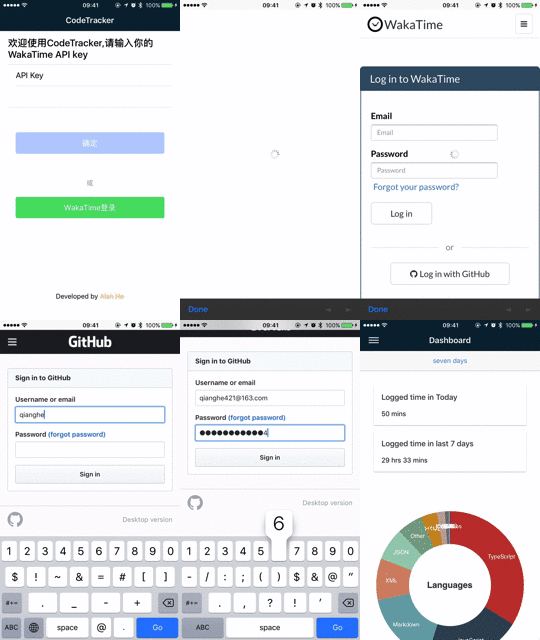
Implementation
Main code
Only the key part is shown.
@Component({
    selector: 'page-welcome',
    templateUrl: 'welcome.html'
})
export class WelcomePage {

    apiKey: string = '';
    loading: Loading;
    accessToken: string;

    constructor(public navCtrl: NavController,
                private apiService: ApiService,
                private authService: AuthService,
                public loadingCtrl: LoadingController,
                private iab: InAppBrowser) {
        this.loading = this.loadingCtrl.create({
            spinner: 'bubbles',
            showBackdrop: true
            // content: 'Please wait...'
        });
    }


    /**
     * WakaTime authorization
     */
    grantClicked() {
        let url = `https://wakatime.com/oauth/authorize?client_id=${CLIENT_ID}&response_type=token&redirect_uri=${REDIRECT_URI}&scope=email,read_stats`;
        let browser = this.iab.create(url, "_blank", "location=no,clearsessioncache=yes,clearcache=yes");
        let listener = browser.on('loadstart').subscribe((event: any) => {
            // Ignore the wakatime authorize screen
            if (event.url.indexOf('oauth/authorize') > -1) {
                return;
            }
            // Check the redirect uri
            if (event.url.indexOf(REDIRECT_URI) > -1) {
                listener.unsubscribe();
                browser.close();
                let token = event.url.split('=')[1].split('&')[0];
                console.log(event.url);
                this.accessToken = token;
                LocalSettingService.setAuthorization(this.accessToken);
                this.login();
            } else {
                console.log("Could not authenticate");
            }
        });
    }
}
Notes
- In principle, the app opens an in-app browser, the user logs in and authorizes, the callback includes a token. You listen to URL changes, extract the token, then continue.
- For apps,
REDIRECT_URIishttp://localhost. - My successful callback URI looked like:
http://localhost/#access_token=sec_VjDDAPwUz8b6p6RezqckosgD2oNVqS0aYyuFGo4gpEYsRpIVcgmxzXTId8iKpelEszZpuzQJc4cWM6Na&refresh_token=ref_EDkGC1NyhcnEU76mYlg7FRuWdymLDNDUcvF4NhqT4UNUUECPqIGrM1xU2mXzSyfmTCvqn9sVdn2baO6k&scope=email%2Cread_stats&uid=1fcb745b-b90e-4660-9c2d-2ae97a8ba010&token_type=bearer&expires_in=43200
Other OAuth systems are similar.
- If you are unclear about OAuth, I recommend Ruan Yifeng’s article Understanding OAuth 2.0


