The Problem
As Angular applications grow in complexity, the number of modules and components increases, leading to a larger bundle size. To prevent a sluggish initial load and improve user experience, Angular provides Lazy Loading.
Ideally, lazy loading splits the application into multiple JavaScript chunks, allowing the browser to load specific modules only when the user navigates to the corresponding route.
However, during an AOT (Ahead-of-Time) build, I noticed that these separate lazy-loaded chunks were missing. Instead, main.js was unexpectedly large. A quick search within the bundle revealed that logic which should have been lazy-loaded was actually embedded in the main file. Interestingly, the lazy loading worked perfectly fine when using a JIT (Just-in-Time) build.
This discrepancy suggested a bug or incompatibility in the build toolchain. The version causing the issue was:
"@ngtools/webpack": "1.2.3"
The Solution
The fix was as simple as upgrading the build tool. After updating to version 1.3.1, the AOT build correctly generated the separate lazy-loaded chunks.
npm install @ngtools/webpack@1.3.1 --save-dev
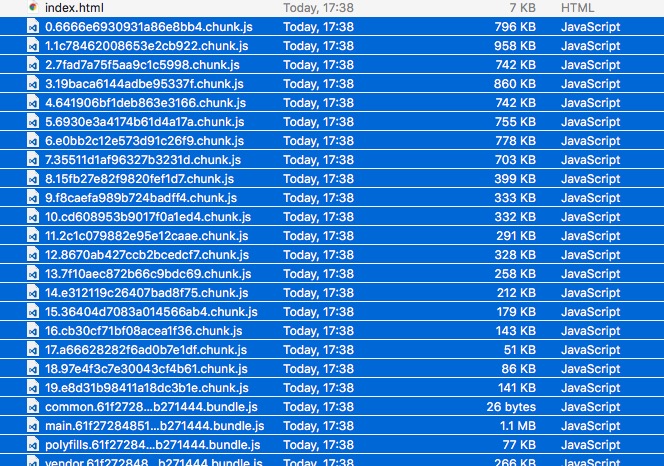
Re-running the AOT build confirmed that the splitting was working as intended:
Important Notes
- Memory Usage: AOT compilation is resource-intensive. If your build fails with “JavaScript heap out of memory” errors, you may need to increase the Node.js memory limit. You can find more details on how to do that here.
- Version Compatibility: You don’t always need the absolute latest version, as build tools have complex dependencies. Match your tools to your Angular version. For instance, my project used Angular
4.0.1(released March 2017), so I chose@ngtools/webpack1.3.1(released April 2017) to ensure compatibility. - Server-Side Optimization: For production deployments, always enable GZIP or Brotli compression. This typically reduces the payload size by over 50%, significantly speeding up the initial load time.


