While building an Angular project with webpack, I frequently hit
JavaScript heap out of memory(V8 OOM). After some digging, here’s the fix.

Solution
The build’s memory usage exceeds V8’s default heap size. Raise the limit.
1) In your build scripts
Add node --max_old_space_size=4096. Example below.

2) Don’t patch binaries in node_modules
Some posts suggest editing node_modules/.bin/webpack. It works but is not recommended — node_modules is third‑party code. Reinstalls or upgrades will wipe your change and it harms collaboration.
If you do patch the .bin script, it looks like this:
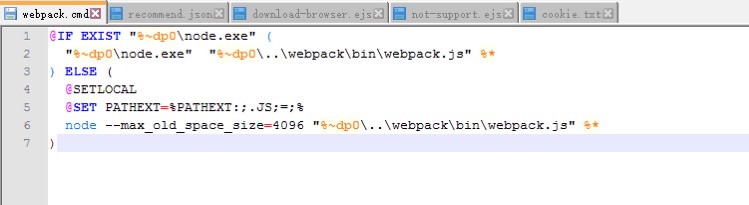
Use the build‑script approach instead of editing binaries.
Notes
Currently, by default v8 has a memory limit of 512mb on 32-bit systems, and 1gb on 64-bit systems. The limit can be raised by setting –max-old-space-size to a maximum of ~1gb (32-bit) and ~1.7gb (64-bit), but it is recommended that you split your single process into several workers if you are hitting memory limits.
This explains V8’s default heap limits and why increasing --max_old_space_size fixes the issue.

