This article introduces POST data encoding methods, including their advantages, implementation details, and relevant resources, which can help improve the efficiency of POST data encoding.
Oct 16, 2017·2 min read
·391
Words
·-Views
-Comments
·
Digital Life
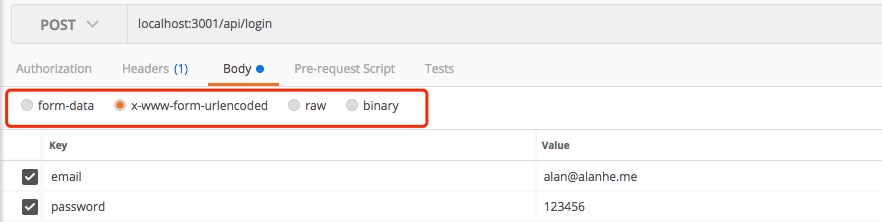
Postman is a powerful API debugging tool. When executing POST requests, you’ll notice there are 4 format options for the body. What do these four options mean and what are their use cases? After researching various sources, I’ve summarized them below:
Although Postman displays form-data, x-www-form-urlencoded, raw, and binary, the actual data formats submitted are not these 4 types, but rather multipart/form-data, application/x-www-form-urlencoded, application/json, and text/xml.
When a web browser sends a POST request from a web form element, the default Internet media type is “application/x-www-form-urlencoded”.[8] This is a format for encoding key-value pairs with possibly duplicate keys. Each key-value pair is separated by an ‘&’ character, and each key is separated from its value by an ‘=’ character. Keys and values are both escaped by replacing spaces with the ‘+’ character and then using URL encoding on all other non-alphanumeric[9] characters.
For native browser form elements, if the enctype attribute is not set, the data will ultimately be submitted using the application/x-www-form-urlencoded format.
The application/json Content-Type is commonly seen as a response header, but increasingly, people are using it as a request header to tell the server that the message body is a serialized JSON string. This makes it easy to submit complex structured data and is particularly suitable for RESTful APIs.
Understanding the different POST data encoding methods is crucial for effective API development and debugging. Each method serves specific purposes:
application/x-www-form-urlencoded: The default for simple form submissions
multipart/form-data: Essential for file uploads
application/json: Ideal for structured data in RESTful APIs
raw/binary: Provides flexibility for custom data formats
Choosing the right encoding method depends on your specific use case and the data you need to transmit. Tools like Postman make it easy to experiment with different formats during development.