Original link: TypeScript vs. JavaScript: Should You Migrate Your Project to TypeScript?
In September 2016, the first official Angular 2 release recommended TypeScript. As a result, many Angular developers chose TS. Other frameworks like React and Vue also support TS now. TS is hot, but why is it good? How does it differ from JS, and what pain points does it solve? I saw a great article and translated it here in case it helps.

In programming, TypeScript (TS) and JavaScript (JS) are both popular. But what are the differences, and when should each be used? This article compares them, discussing differences, pros, and cons.
What is TypeScript
TypeScript is a superset of JavaScript that compiles to JavaScript (EcmaScript 3+). It provides type annotations for optional static type checking at compile time. Because it is a superset, all JS syntax is valid in TS. But that does not mean all JS will pass the TS compiler.
let a = 'a';
a = 1; // throws: error TS2322: Type '1' is not assignable to type 'string'.
TypeScript advantages
Type annotations
TypeScript was created for “static type analysis.” It allows us to create safe declarations. Compare this JS and TS function:
// Basic JavaScript
function getPassword(clearTextPassword) {
    if(clearTextPassword) {
        return 'password';
    }
    return '********';
}

let password = getPassword('false'); // "password"
JavaScript cannot prevent invalid arguments, and runtime does not error. In TypeScript, you can avoid this:
// Written with TypeScript
function getPassword(clearTextPassword: boolean) : string {
    if(clearTextPassword) {
        return 'password';
    }
    return '********';
}

let password = getPassword('false'); // throws: error TS2345: Argument of type '"false"' is not assignable to parameter of type 'boolean'.
This shows how TS prevents calls with unexpected types. Historically, one JS problem is lack of type checking, which causes tracking issues for people unfamiliar with JS complexity.
Language features
Besides static type analysis, TS adds these features:
API documentation
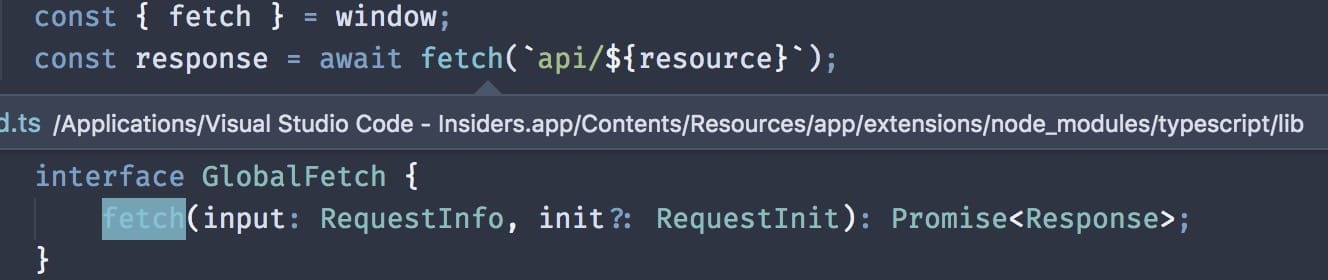
If getPassword(…) belongs to a library, how do we know its types? We can use jsdoc, IDEs like VSCode, or docs like Dash. But none provides the TS experience. Take the fetch API example. The screenshot shows VSCode Peek Definition. With these tools, you can see argument and return types. This is better than traditional JS + jsdoc.
Misconceptions
There are misconceptions for people choosing TS:
- ES6 features: Some choose TS for ES6 features like modules, classes, arrow functions. But Babel can handle this. It’s not common to see TS and Babel together.
- Easier than JavaScript: This is subjective. Some argue TS introduces syntax noise. The key is that TS doesn’t hide JS. It is a superset and does not protect against issues unrelated to static typing (this, scope, prototypes, etc.). Developers still need strong JS fundamentals.
- Type correctness == program correctness: This is not true, but static types provide a safety net. If type correctness doesn’t imply program correctness, how do we ensure correctness? Unit tests. Tests can catch most errors.
- Static typing supports tree shaking: Tree shaking removes dead code through static structures (named imports/exports, constants). TS currently does not support tree shaking by itself.
Syntax and compilation comparison
People choose TS because of modules and classes, but ES6 JS also supports these. You can transpile to ES5 for compatibility. Below are syntax comparisons for TS, its compiled output, and ES6 + Babel output.
Classes
// -- TypeScript -- //
class Article {
    name: string;
    constructor(name: string) {
        this.name = name;
    }
}

// -- TypeScript compiled output -- //
var Article = /** @class */ (function () {
    function Article(name) {
        this.name = name;
    }
    return Article;
}());
// -- JavaScript with Babel -- //
class Article {
    constructor(name) {
        this.name = name;
    }
}

// -- Babel compiled output -- //
"use strict";

function _classCallCheck(instance, Constructor) { if (!(instance instanceof Constructor)) { throw new TypeError("Cannot call a class as a function"); } }

var Article = function Article(name) {
    _classCallCheck(this, Article);

    this.name = name;
};
Modules
Modules
// -- TypeScript -- //
export default class Article { }

// -- TypeScript compiled output -- //
define(["require", "exports"], function (require, exports) {
    "use strict";
    Object.defineProperty(exports, "__esModule", { value: true });
    var Article = /** @class */ (function () {
        function Article() {
        }
        return Article;
    }());
    exports.default = Article;
});
// -- JavaScript with Babel -- //
export default class Article { }

// -- Babel compiled output -- //
"use strict";

Object.defineProperty(exports, "__esModule", {
  value: true
});

function _classCallCheck(instance, Constructor) { if (!(instance instanceof Constructor)) { throw new TypeError("Cannot call a class as a function"); } }

var Article = function Article() {
  _classCallCheck(this, Article);
};

exports.default = Article;
Optional params
// -- TypeScript -- //
function log(message: string = null) { }

// -- TypeScript compiled output -- //
function log(message) {
    if (message === void 0) { message = null; }
}
// -- JavaScript with Babel -- //
function Log(message = null) { }

// -- Babel compiled output -- //
"use strict";

function Log() {
  var message = arguments.length > 0 && arguments[0] !== undefined ? arguments[0] : null;
}
When to choose TypeScript vs JavaScript
TypeScript
- You want type checking at compile time, rather than runtime checks in vanilla JS.
- New library/framework development. For example, starting a React project where you are not familiar with the API. With type definitions, you get better IntelliSense and navigation to learn APIs quickly.
- Large projects or teams. TypeScript interfaces and access modifiers are valuable for collaboration.
JavaScript
- Build tooling requirements: TypeScript adds a build step. But fewer projects now avoid build tools.
- Small projects: TS may be overkill for small teams or small codebases.
- Robust testing workflow: If you already have test-driven development, switching to TS might cost more than it yields.
- Extra dependencies: To use TS libraries, you need type definitions. Each definition is another npm package with maintenance risk. That can reduce TS benefits. Note: DefinitelyTyped mitigates this; most popular types are there.
- Framework support: If your framework does not support TS, you cannot use its features. For example EmberJS (though it is planned; TS is a language for Glimmer).
Other considerations
So you decided to introduce a type system. Is TS the only choice? No. There are two mainstream alternatives worth considering:


