I often need to VPN into the company from home. The repeated steps are tedious, so I wrote a small shell/expect script to streamline it.
Previous Operation
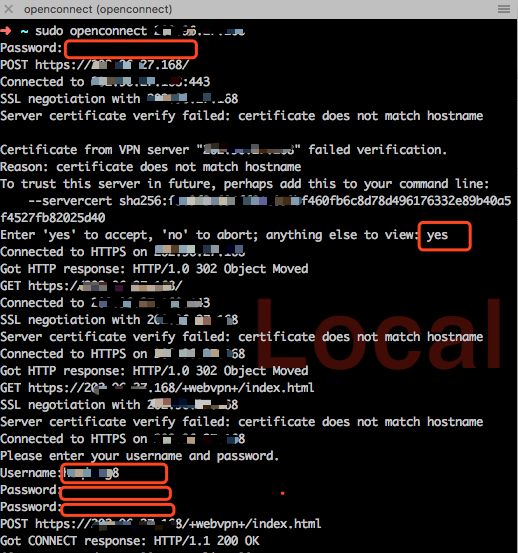
As shown, every time I had to enter the OpenConnect command, a hard‑to‑remember IP, and go through 5 interactive prompts. Time to automate it with a shell script.
Shell automation
Except for the final OTP/password (which I still enter manually), all other inputs can be scripted. I use expect to handle the interactive prompts.
Install expect
Run brew install expect.
Script
Save as vpn.sh:
#!/usr/bin/expect
# vpn to xxx
spawn sudo openconnect 1.1.1.1
expect "Password" {send "xxxxxxxx\r"}
expect "Enter 'yes' to accept" {send "yes\r"}
expect "Username:" {send "xxx\r"}
expect "Password" {send "xxx\r"}
interact
Done. To connect:
./vpn.sh- Enter the one‑time code manually
Much faster.

