Since company projects require using internal Maven resources, which aren’t needed at home, switching settings back and forth is time-consuming. Inspired by automation, I considered creating a script to switch sources.
Script-Based Initial Solution
I came across an article by a fellow developer about script-based switching, which gave me an idea. Here’s the script:
#!/bin/bash

base_dir=~/.m2
setting_home=settings_home.xml
setting_work=settings_work.xml

PS3='Please enter the number of your choice: '
options=("home" "work")
select opt in "${options[@]}"
do
    case $opt in
        "home")
        ln -sfn ${base_dir}/${setting_home} ${base_dir}/settings.xml
            echo "Switched setting.xml to home!"
            break
            ;;
        "work")
        ln -sfn ${base_dir}/${setting_work} ${base_dir}/settings.xml
            echo "Switched setting.xml to work!"
            break
            ;;

    esac
done
The script allows interactive execution to switch settings. However, this method still requires running the script each time. Is there a way to achieve one-click switching? Yes! Alfred can do it.
How can we achieve this?
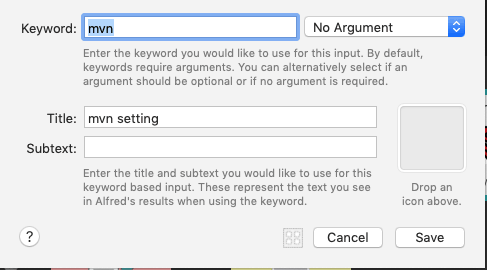
Adding an Input Keyword
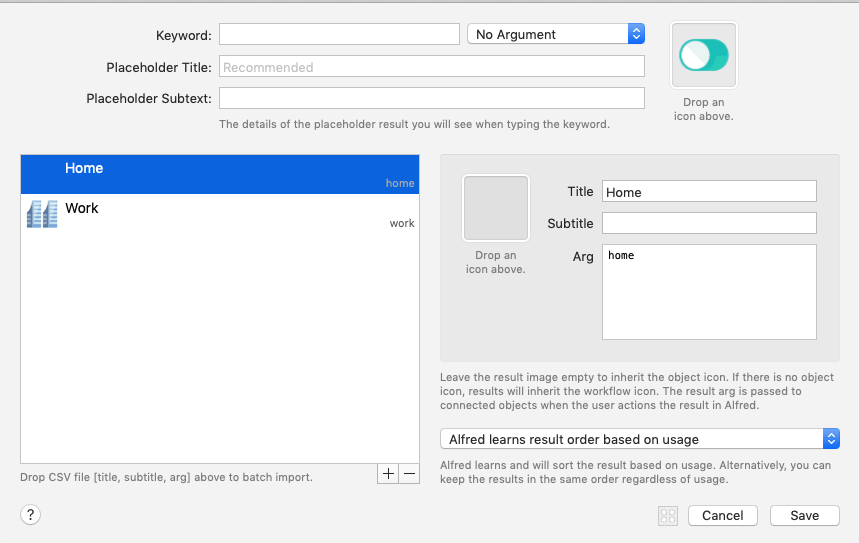
Adding a List Filter
Adding Script Execution
The above script was slightly modified as follows:
base_dir=~/.m2
setting_home=settings_home.xml
setting_work=setting_work.xml

if [ "{query}" == "home" ];
then
        ln -sfn ${base_dir}/${setting_home} ${base_dir}/settings.xml
else
        ln -sfn ${base_dir}/${setting_work} ${base_dir}/settings.xml
fi
Default Maven Settings Configuration
Here’s a link to the default settings.xml configuration:
Click here
Adding Notifications
To enhance the experience, add a notification after each successful switch.
Screenshots
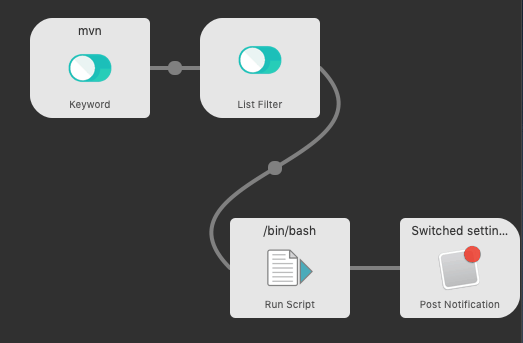

With this setup, you can switch Maven settings with one click. Perfect.

