The previous article introduced Jest setup and how to run tests. This one focuses on testing React projects.
Project tech stack
This is a general UI component library, so it does not involve Redux or APIs. The stack is relatively simple:
- React
- TypeScript
- Antd
- Less
- react-intl
Testing objectives
When testing, decide what to test:
- Functional correctness of utility functions
- Component functionality (UI, interactivity, etc.)
3A principle
Arrange
The preparation part initializes objects and the input data for the method under test.
Act
The execution part calls the method under test with prepared parameters.
Assert
The assertion part verifies that execution matches expectations.
Test setup
Creating intl-enzyme-test-helper
Because I don’t want to test internationalization, I mock it. Otherwise it throws intlProvider errors.
import React from 'react';
import { IntlProvider, intlShape } from 'react-intl';
import { mount, render, shallow } from 'enzyme';

const messages = {}; // en.json

const intlProvider = new IntlProvider({ locale: 'en', messages, onError: () => '' }, {});
const { intl } = intlProvider.getChildContext();

function nodeWithIntlProp(node) {
  return React.cloneElement(node, { intl });
}

export function shallowWithIntl(node) {
  return shallow(nodeWithIntlProp(node), { context: { intl } });
}

export function mountWithIntl(node) {
  return mount(nodeWithIntlProp(node), {
    context: { intl },
    childContextTypes: { intl: intlShape }
  });
}

export function renderWithIntl(node) {
  return render(nodeWithIntlProp(node), {
    context: { intl },
    childContextTypes: { intl: intlShape }
  });
}

export function rendererWithIntl(node) {
  return renderer.create(<IntlProvider locale='en' messages={messages}>{node}</IntlProvider>);
}
Complete code: see here
Suppress intl missing errors
Because const messages = {}; // en.json has no translations, tests pass but log errors. We suppress them with:
onError: () => ''
Usage
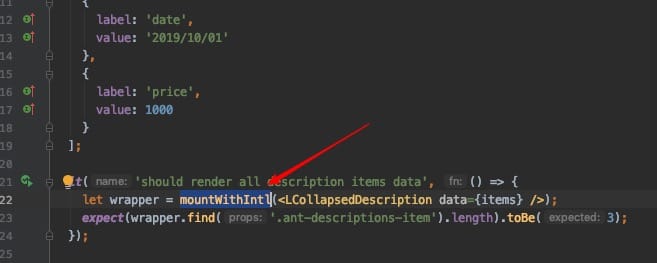
Creating enzyme-setup
Component tests use enzyme, so enable the corresponding adapter:
import { configure } from 'enzyme';
import Adapter from 'enzyme-adapter-react-16';

// React 16 Enzyme adapter
configure({ adapter: new Adapter() });
Jest also needs config:
setupFiles: ['<rootDir>/test/enzyme-setup.ts']
If not configured, it throws:
Error: Enzyme Internal Error: Enzyme expects an adapter to be configured, but found none. To configure an adapter, you should call
Enzyme.configure({ adapter: new Adapter() })before using any of Enzyme’s top level APIs, whereAdapteris the adapter corresponding to the library currently being tested. For example:
Utility function testing
This is the simplest: decide input and output. For frontend projects using Redux, testing a reducer is similar. I see them as pure functions (input -> output).
import { formatPrice } from '../../components/utils/common-utils';

describe('common-utils test', () => {
  it('should return formatted price when value is 0 or undefined or null', () => {
    expect(formatPrice(0)).toEqual('');
    expect(formatPrice(undefined)).toEqual('');
    expect(formatPrice(null)).toEqual('');
  });
});
Component testing
Component testing uses enzyme’s mount, render, shallow.
Differences between render, mount, and shallow
render uses Cheerio, and returns static HTML. It is good for snapshot tests. shallow and mount return React trees (not DOM). If you use React DevTools, these appear under the React tab. render gives the Elements tab output.
The bigger difference is that shallow and mount return a ReactWrapper with methods like find(), parents(), children(), state(), props(), setState(), setProps(), simulate().
shallow renders only the current component. mount renders current and child components. For interaction tests, I usually use mount. But mount is heavier and uses more memory. If you do not need to assert child components, use shallow.
Component rendering and interaction tests
LCollapsedDescription is a description component with collapse functionality.
import * as React from 'react';
import LCollapsedDescription, { LDescriptionItem } from '../../components/collapsed-description';
import { mountWithIntl } from '../intl-enzyme-test-helper';

describe('collapsed-description component test', () => {
  const items: LDescriptionItem[] = [
    {
      label: 'name',
      value: '1111'
    },
    {
      label: 'date',
      value: '2019/10/01'
    },
    {
      label: 'price',
      value: 1000
    }
  ];

  it('should render all description items data', () => {
    let wrapper = mountWithIntl(<LCollapsedDescription data={items} />);
    expect(wrapper.find('td').length).toBe(3);
  });

  it('should render two description items data when limit is 2', () => {
    let wrapper = mountWithIntl(<LCollapsedDescription data={items} limit={2} />);
    expect(wrapper.find('td').length).toBe(2);

    wrapper.find('Icon').simulate('click');
    expect(wrapper.find('td').length).toBe(3);

    wrapper.find('Icon').simulate('click');
    expect(wrapper.find('td').length).toBe(2);
  });

  it('should render  description items each row data', () => {
    const wrapper1 = mountWithIntl(<LCollapsedDescription data={items} />);
    expect(wrapper1.find('tr').at(0).children().length).toBe(3);

    const wrapper2 = mountWithIntl(<LCollapsedDescription data={items} column={2} />);
    expect(wrapper2.find('tr').at(0).children().length).toBe(2);
    expect(wrapper2.find('tr').at(1).children().length).toBe(1);

  });

});
Notes:
- In case1, if you change
mountWithIntltoshallowWithIntl, the test fails because shallow only renders the current component.renderWithIntlwill work. - In case2, if you change
mountWithIntltorenderWithIntl, the test fails because render produces DOM nodes and cannot find React components (capitalized tags). Also, simulate does not exist.
These examples clarify differences. Use each as needed.
Snapshot testing
Snapshot testing saves a snapshot of the rendered output on the first run, and compares later runs against it.
 import renderer from 'react-test-renderer';

 it('should enable children elements when enable is true', () => {
    const wrapper = renderer.create(<AuthEnable enable>
      <button>click it</button>
    </AuthEnable>).toJSON();

    expect(wrapper).toMatchSnapshot();
  });
- Snapshot tests prevent unintentional structural/style changes.
- They are only a supplement.
If you unintentionally change a component, UT failures show error info for troubleshooting.
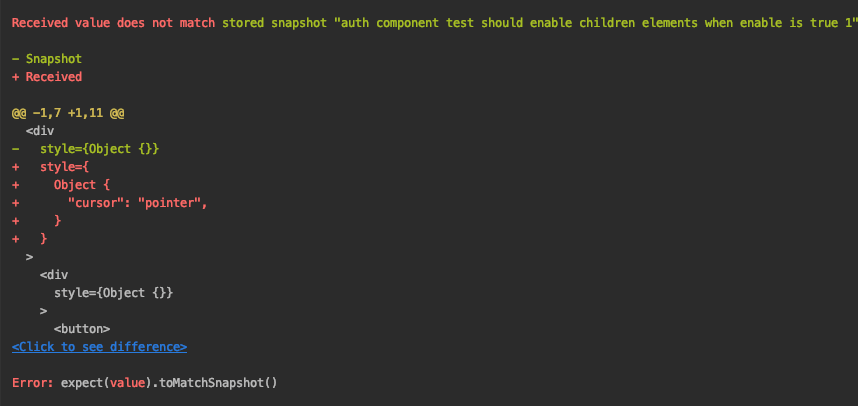
Enzyme vs react-test-renderer snapshots
react-test-renderer snapshots are simpler and more readable, showing complete HTML.
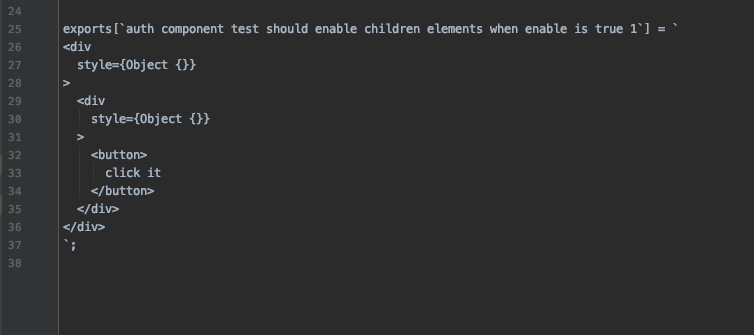
Supplementary
Regarding testing in this UI library, the above covers basics. Beyond that is continuous enrichment.
If we test Redux or redux-saga:
Reducer testing
Redux has three parts: action, reducer, store. Actions are objects; not much to test. Reducers are pure functions, same as utility testing. Store is a big object; I do not think it needs tests. For component/effect tests, mock the store to desired values.
Effects testing
In my projects, I extract request handling into the effects layer. The React component layer just renders data.
The React component layer no longer directly handles API requests - this is the approach in my current project.
For effects tests:
Note: API requests are not the focus - we only care whether data is correct, so mock them.
export default class SagaSpecFactory {
  static getAPIStub(apiMethodFunc: any, response: object): any {
    return ({ fn, args }, next) => {
      if (fn === apiMethodFunc) {
        return response;
      }
      return next();
    };
  }
}
Complete code: see here
 it('should init app when init app action', () => {
    return expectSaga(initAppActionEffects, { params: {  } })
      .provide([
        {
          call: SagaSpecFactory.getAPIStub(getUserInfo, { data: user })
        },
        {
          call: SagaSpecFactory.getAPIStub(getMenusByUser, menus)
        }
      ])
      .call(getUserInfo)
      .call(getMenusByUser, user)
      .put.like({
        action: {
          type: GlobalActionTypes.INIT_MENU,
          menus
        }
      })
      .put.like({
        action: initAppCompleteAction()
      })
      .run();
  });
Final Thoughts
Regarding testing, I have two thoughts:
- Don’t test just for the sake of testing. If tests don’t bring benefit, don’t write them. Both dev and testing need ROI.
- Testing reduces manual test costs. Repeated testing is manual labor; automated tests improve efficiency and quality. Good tests can serve as living documentation. For teams, tests should be written, but the amount depends on the project.
- These are my superficial views - not all may be correct, but they are moving in the right direction.


