I’ve previously listed my commonly used apps and hardware. This time I’m cataloging the Chrome extensions I use daily, with some notes.
The extensions I use fall into two categories.
Updated continuously
Daily use
Use alongside 1Password on Mac and iPhone; summon with a shortcut to autofill quickly.
The well‑known ad blocker. Some sites (e.g., iQIYI) can’t be blocked fully; sometimes paid services are the right call.
Great for non‑native written English — and free. Useful when writing on GitHub/Medium; paired with Google Translate, it covers basic communication.
Works with my Synology — clicking a movie link can trigger a direct download task.
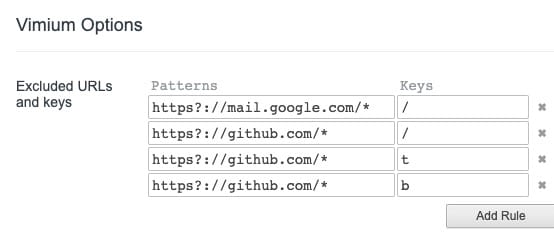
Use Vim‑style navigation (e.g., G to bottom, yy to copy URL). Once learned, it boosts efficiency.
Note: Some shortcuts conflict with GitHub’s; add exclusion rules.
Tampermonkey This complements all extensions: inject custom JS for specific sites. For example, a movie site I visit loads ad scripts that redirect on click — Tampermonkey lets me remove them.
(function() {
 'use strict';
 window.setTimeout(()=>{
 const ads = document.querySelectorAll('a[id^="cs_ap_"],div[id^="cs_DIV_cscpvric"],iframe');
    ads.forEach(item=>{
      item.remove();
    });
    document.body.onkeydown=null;
 },200);
 })();
Hide results from certain sites; great for filtering out low‑quality engines.
Beautifies Wikipedia’s UI.
Quickly/bulk download images from a page; supports a toggle hotkey.
Convert selected text to Markdown via context menu — very efficient when you need MD.
Developer tools
Must‑have for web devs: see the stack used by a site at a glance.
For sites you’re visiting, get basic info like server country, IP, etc.
Must‑have for React devs.
Must‑have for Redux devs.
Download extensions as CRX
For well-known reasons, Google is often inaccessible, so you can’t access the Web Store to download extensions. But Chrome supports offline installation. How do you find the CRX file?
Recommended site: paste a store URL and download the CRX. This site isn’t blocked in China.
Install
Open Chrome Extensions and drag the CRX file into Chrome to install automatically.
While this solves installation without Google access, ideally fix access so you can use the Web Store directly.
Final Thoughts
Those are my go‑to extensions. Don’t chase tools or “efficiency” for their own sake. Find what fits you and actually solves problems.


