While reviewing an MR recently I saw someone call
btoaand was confused—turns out it’s the native Base64 encoder. Clearly I had a gap in my JS fundamentals, so I’m jotting down a quick recap.
Native Base64 encoding and decoding in browsers
console.log(window.btoa('hello')); // aGVsbG8=
console.log(window.atob('aGVsbG8=')); // hello
How to remember a to b
- “a” for “ASCII”
- “b” for “binary”
Note: ASCII only covers English characters. See my earlier post for more background.
Handling Chinese characters
   console.log(window.btoa(encodeURIComponent('中文'))); // JUU0JUI4JUFEJUU2JTk2JTg3
   console.log(decodeURIComponent(window.atob('JUU0JUI4JUFEJUU2JTk2JTg3'))); // Chinese
As shown above, strings containing Chinese characters need to be encoded first. Calling btoa directly throws an error:
t2020-07-02-135210.html:14 Uncaught DOMException: Failed to execute ‘btoa’ on ‘Window’: The string to be encoded contains characters outside of the Latin1 range. at
Why? ASCII doesn't support Chinese...
Parameter type for btoa
btoa expects a string. If you pass a non-string value, JS will coerce it to a string before encoding. For example, window.btoa({ a: '中文' }) is effectively window.btoa('[object Object]'), so keep that in mind.
It’s a bit safer in TypeScript because the type annotations guide you toward the correct input.
Browser support
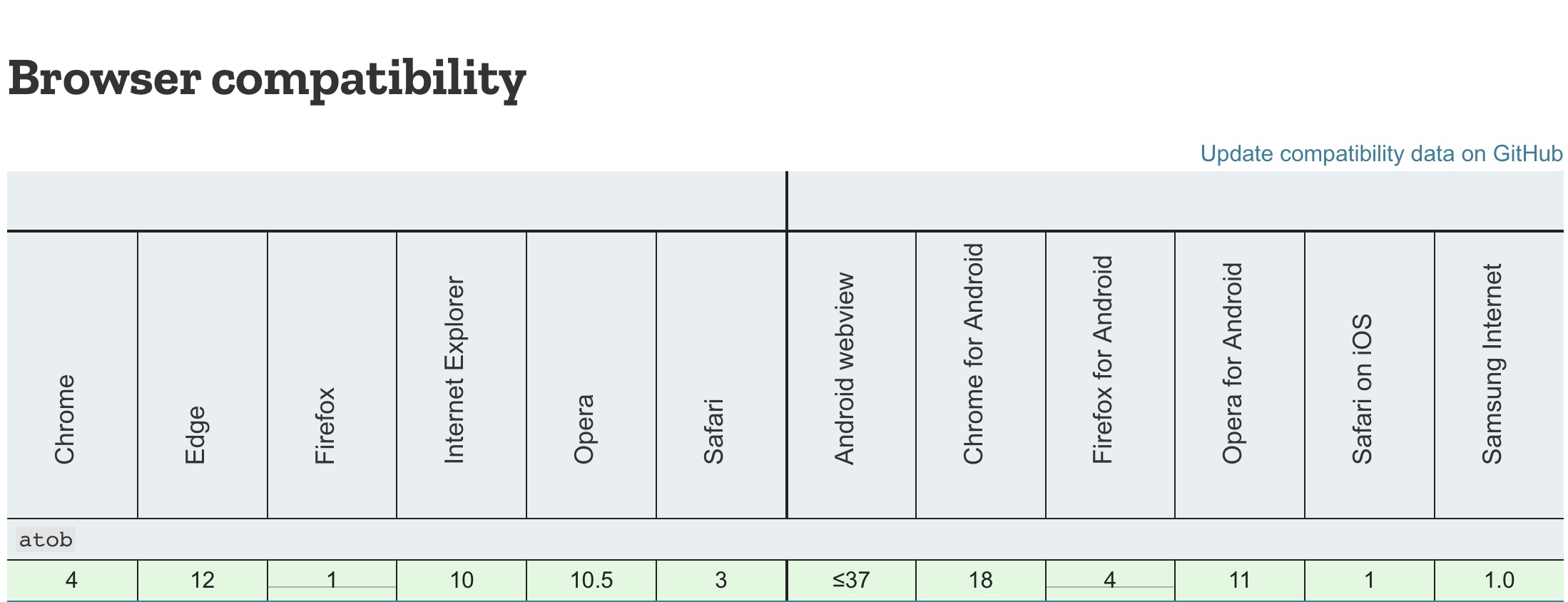
IE10+ supports it just fine. Need to cover IE9? Sure, brave soul—ship a polyfill.
Say goodbye to js-base64
Now that browsers support it natively, there’s no need to depend on a third-party library. Once I learned about the native APIs, I immediately dropped js-base64. The direct benefit is a smaller bundle size—it’s not a huge change, but still a win.
js-base64 is 8 KB unminified and 5 KB minified
Final Thoughts
A quick note to reinforce the idea and close the knowledge gap.

