The more I use Git, the more I like it. But some underlying knowledge isn’t systematic, such as what snapshots are and how Git stores them. I’m documenting it here.
Snapshot recording
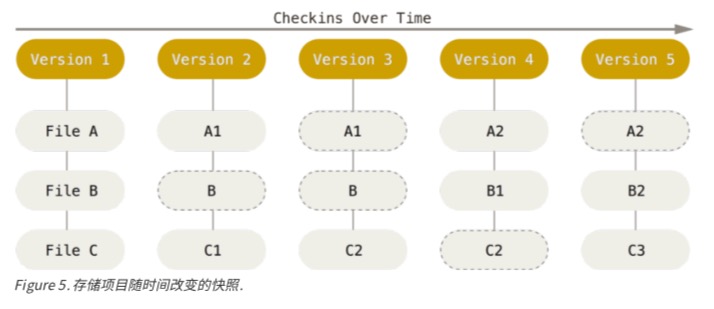
On each commit, Git scans all files in the repository. If a file changes, it generates a new Blob that contains the full content at the time of the commit. If a file doesn’t change, it records a link to the previously stored file.
Each commit has its own index, which is used to locate both changed and unchanged files.
The diagram below helps visualize the repository state for each snapshot (version).
Snapshot storage
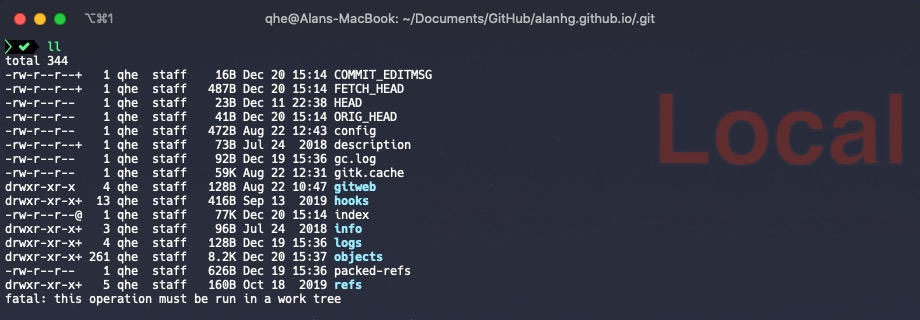
Knowing how snapshots are recorded, where are they stored? In the hidden .git folder.
There are many items in that folder. The ones we care about for snapshot storage are index and objects. For other parts, see Pro Git.
To understand how Git stores data, let’s initialize an empty project:
mkdir git-demo & cd git-demo & git init & echo "just a demo"> README.md
Start executing Git operations.
git add
When you run git add ., the index file stores the index of files to be committed. To view it, use the low-level command git ls-files -s.
$ git ls-files -s
100644 a730a28e53d8defdda8fe953829afdfc906e463a 0	README.md
Note: Because it is a binary file, you can’t view it as plain text, only in the format above. You can see the index records README.md and the blob file name a730a28e53d8defdda8fe953829afdfc906e463a, a 40-character SHA-1.
The blob files are stored in .git/objects. The first two characters a7 are the folder, and the remaining 38 characters are the file name.
At this point, you can run git cat-file -p a730a2 to view the full content of the committed file.
$ git cat-file -p a730a2
just a demo
git commit
When you run git commit -m 'init readme', after the commit succeeds:
$ git commit -m 'init readme'
[master (root-commit) 79821c6] init readme
 1 file changed, 1 insertion(+)
 create mode 100644 README.md
Check the .git/objects directory again and you will see two additional folders.
$  ll .git/objects/
total 0
drwxr-xr-x  3 qhe  staff    96B Dec 20 22:22 4e
drwxr-xr-x  3 qhe  staff    96B Dec 20 22:22 79
drwxr-xr-x  3 qhe  staff    96B Dec 20 16:24 a7
drwxr-xr-x  2 qhe  staff    64B Dec 20 16:24 info
drwxr-xr-x  2 qhe  staff    64B Dec 20 16:24 pack
Here, 79 stores the content of the commit, while 4e stores a tree object that keeps file names and other info for that commit.
$ git cat-file -t 4edb6d
tree
At this point, we have a rough understanding of how Git records and stores snapshots during daily operations.
Memory usage
As mentioned above, changed files are stored in full as binary blobs. Over time, this would consume a lot of space. Git optimizes for this.
Git balances time and space by storing full content for the latest version, and only diffs for older or less frequently used versions. This balances storage and read/load speed.
Summary
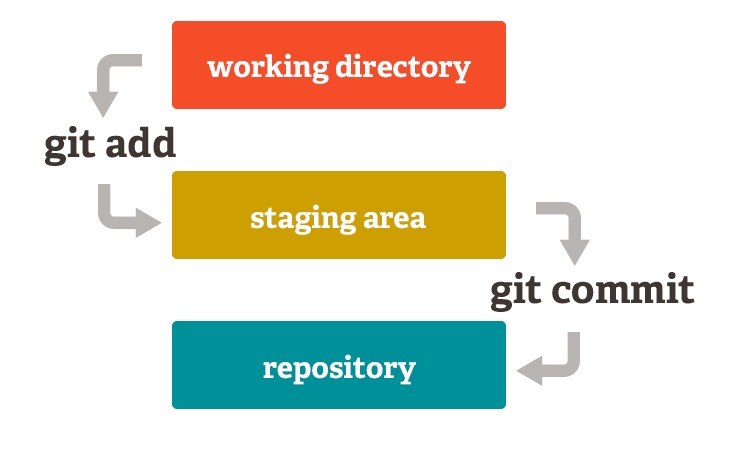
A simplified diagram of daily Git operations:
- During
git add, files are stored in the staging area index/objects. - During
git commit, files are stored in the local repository objects.
Of course, during git push, these objects are sent upstream. But remember Git is distributed, so the upstream and local contents are actually the same.
Final Thoughts
- Git feels simple yet very powerful, which is a hallmark of excellent software design.
- Understanding Git internals helps you use Git more efficiently and gives perspective for daily development issues, such as the storage strategy above.


