Recently discussed some frontend interview questions with friends; summarizing here to solidify fundamentals.
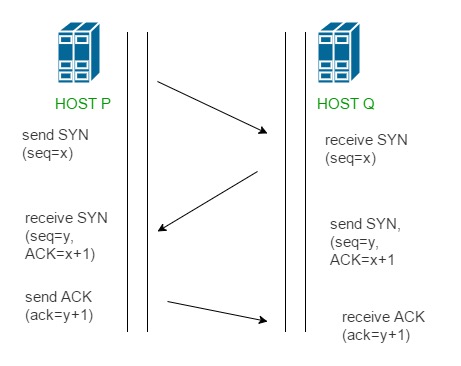
TCP three-way handshake
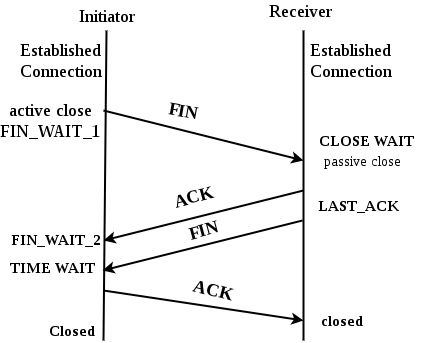
Understand the three-way handshake and four-way FIN sequence. Mnemonic aside, here are the diagrams:
Number precision
console.log(0.1 + 0.2 > 0.3); // true
Why
Decimal 0.1 and 0.2 are converted to binary; many decimals are repeating in base‑2, causing precision issues.
Fix
Use a library like big.js for decimal math.
console.log(new Big(0.1).plus(0.2)==0.3); // true
Frontend local storage options
- localstorage
- sessionStorage
- cookie
Notes
localStorage entries have no built‑in expiration.
sessionStorage does not persist across tabs.
Browsers don’t expose a delete‑cookie API; delete by setting an expired date.
Storage values are strings. When storing objects, serialize/deserialize explicitly; otherwise JS will stringify implicitly.
localStorage.setItem('name', 'alan'); // alan
localStorage.setItem('age', 1); // 1
console.log(typeof localStorage.getItem('age')); // string
localStorage.setItem('user', { name: 'alan', age: 1 }); // [object Object]
localStorage.setItem('null', null); // null
localStorage.setItem('undefined', undefined); // undefined
Hoisting
- In JS, declarations of functions and variables are hoisted to the top of their scope.
- Variables can be used before their declaration.
- Only declarations are hoisted; initializations are not.
- function, var, let, const, and class are all hoisted;
varinitializes toundefined, whilelet/constremain uninitialized (TDZ).
Example
// source code
console.log(a); // undefined
var a= 'Hello World!';

// transformed
var a;
console.log(a); // undefined
a = 'Hello World!';
helloWorld(); // TypeError: helloWorld is not a function
var helloWorld = function () {
        console.log('Hello World!');
     };
Closure
A function bundled with references to its surrounding state (lexical environment) is a closure. In other words, closures allow an inner function to access the scope of its outer function. In JavaScript, a closure is created whenever a function is created.
Example
 var btn = document.getElementsByTagName('button');
      for (var i = 0; i < btn.length; i++) {
        btn[i].onclick = function () {
          console.log(i); // always 5
        };
      }
We can use a closure, like this:
 var btn = document.getElementsByTagName('button');
      for (var i = 0; i < btn.length; i++) {
        btn[i].onclick = ((j) => () => console.log(j))(i);
      }
Asynchronous Execution Order
Asynchronous means two or more objects or events do not exist or occur at the same time (or the occurrence of multiple related things does not need to wait for the completion of the previous thing). In computer technology, the term “asynchronous” is used in two main contexts (networking and communication, software design).
Notes
- Promises are asynchronous
- XHR can be synchronous or asynchronous
- window.setTimeout is asynchronous
Example
async function async1() {
    console.log('async1 start');
    await async2();
    console.log('async1 end');
}

async function async2() {
    console.log('async2');
}

console.log('script start');

setTimeout(function() {
    console.log('setTimeout');
}, 0);

async1();

new Promise(function (resolve) {
    console.log('promise1');
    resolve();
}).then(function() {
    console.log('promise2');
});

console.log('script end');
Answer:
- script start
- async1 start
- async2
- promise1
- script end
- async1 end
- promise2
- setTimeout
Decode URL Encoded Multiple Times
 let url = 'https://baike.baidu.com/item/%25E8%2583%25A1%25E6%25AD%258C/312718';
      do {
        url = decodeURI(url);
      } while (url !== decodeURI(url));
      console.log(url);
CSS Box Model
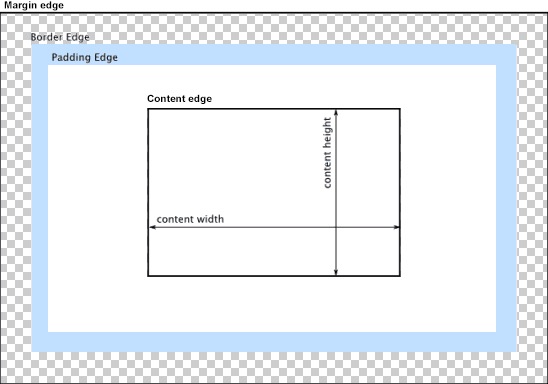
When laying out a document, the browser’s rendering engine represents all elements as rectangular boxes according to the CSS basic box model. CSS determines the size, position, and properties (such as color, background, border size, etc.) of these boxes.
Example
.box {
    width: 100px;
    height: 100px;
    background-color: red;
    padding: 10px;
    border: 10px solid blue;
    margin: 10px;
}
The width of the red area is 120px, because 100px + 10px + 10px
Three Major CSS Features
- Cascade
- Proximity principle: later styles override earlier ones
- Inheritance
- Children inherit from parents
- However, some special tags do not inherit styles
- Specificity
- ID > class [attribute] > tag, specificity decreases
Example
  <style>
      .red {
        color: red;
      }
      .blue {
        color: blue;
      }
      * {
        color: black !important;
      }
    </style>

 <div class="blue red">hello world</div>
The actual text will be black because !important has the highest priority, but if you remove it, it will be blue because CSS cascading rules state that later styles override earlier ones.
Frontend Performance Optimization
- gzip compression / pre-compression
- HTML, CSS, JS minification
- Frontend caching
- Lazy loading, preloading, reducing JS bundle size
- Fully utilize request bandwidth, e.g., concurrent requests
Note: single domain request count limit - CDN for static resources to improve cache/request speed
- Code optimization, e.g., SPA render optimization, reducing render frequency, using WebSocket instead of polling for some cases to reduce request count
- SSR (Server-Side Rendering)
- High-frequency high-consumption calculations can use Web Workers
Final Thoughts
These questions show that they are still basic problems, but we also need to understand that there are many frontend knowledge points today. In addition to being familiar with the frontend trinity [HTML, CSS, JS], we also need to be familiar with networking, algorithms, browser operating principles, etc.


