最近项目面临一个表格性能问题,挺有意思的,这里记录下优化方案
Requirements
- 表格要无限滚动,不要有分页
- 表格列多且显示丰富,比如存在可编辑单元格,tooltip,弹窗等
- 表格行数较多,最大可达1000行,当前业务数据上看最多只有500行,但考虑长远最大需要支持到1000
Current behavior
- 100行时已出现明显卡顿,滚动不流畅
Solution
经过分析,决定采用虚拟列表技术来解决该问题,原理即是根据滚动按需渲染视窗内表格行数据。
当前组件采用的是Antd@v3,查看ChangeLog发现v4已提供了虚拟列表支持,但因此整体升级UI库动力不大,且v4提供的使用方法还是较为啰嗦,因此自行改造解决。
Performance comparison
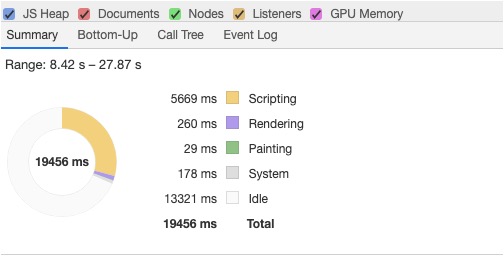
以一个401行数据的性能表现对比。
性能检测工具:Chrome Developer Performance
Before optimization

After optimization
Additionally
可以采用虚拟列表后,效果还是明显好的,但对于当前我的系统而言,还是较为卡顿。
原因是表格本身单元格内DOM元素过于庞杂,比如单元格内容中的冗余DOM标签,比如一些模态弹窗等走全局公共的,而非每个单元格一个等等,这些地方也需要优化,这里不再赘述。
Final Thoughts
- 虚拟列表针对这种业务形态可以很好的优化表格性能,但凡事也有利有弊,比如极限条件下,用户滚动极快,高度就可能会有问题,元素本身也可能会出现卡顿,因为需要快速的读写DOM。
- 针对WEB性能分析工具,Chrome Developer中的Performance工具搭配技术框架配套插件如React Developer Tools足矣。

