If your home router already handles global proxying, there’s no need to enable another proxy on your Mac—it just adds latency. But once you leave home and join office or café Wi-Fi, you do need it. Surge event scripts make this easy to automate.
Docs: https://manual.nssurge.com/scripting/common.html
Configuration
Add this to your config:
[Script]
script1 = type=event,event-name=network-changed,script-path=wifi-changed.js
wifi-changed.js:
const WIFI_DONT_NEED_PROXYS = ['xiaomi_Alan_5G_1'];
const CURRENT_WIFI_SSID_KEY = 'current_wifi_ssid';

if (wifiChanged()) {
  const mode = WIFI_DONT_NEED_PROXYS.includes($network.wifi.ssid)
    ? 'direct'
    : 'rule';
  $surge.setOutboundMode(mode);
  $notification.post(
    'Surge',
    `Wi-Fi changed to ${$network.wifi.ssid || 'cellular'}`,
    `use ${mode} mode`
  );
}

function wifiChanged() {
  const currentWifiSSid = $persistentStore.read(CURRENT_WIFI_SSID_KEY);
  const changed = currentWifiSSid !== $network.wifi.ssid;
  if (changed) $persistentStore.write($network.wifi.ssid, CURRENT_WIFI_SSID_KEY);
  return changed;
}

$done();
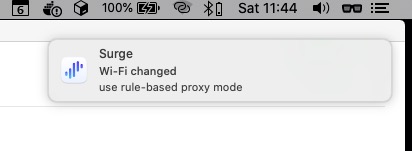
Whenever the Wi-Fi SSID changes, Surge switches outbound mode and posts a notification.
The
network-changedevent fires for any network transition (e.g., toggling VPN). We use$persistentStoreto detect real Wi-Fi changes.
Final Thoughts
Out of the box Surge can handle this sort of quality-of-life automation—one more reason it’s my go-to network tool.


