The values of margin-top, margin-bottom, padding-top, and padding-bottom support percentages. Those percentages are calculated against the container (i.e., the parent element)’s width, not its height (refer to the containing block’s logical width). This detail is easy to overlook, so here’s a quick note.
Example
   .margin-container {
        background: #214177;
        color: #fff;
        width: 600px;
        height: 500px;
      }
      .margin-child {
        width: 200px;
        height: 100px;
        margin-top: 10%;
        background-color: #82a6cb;
      }
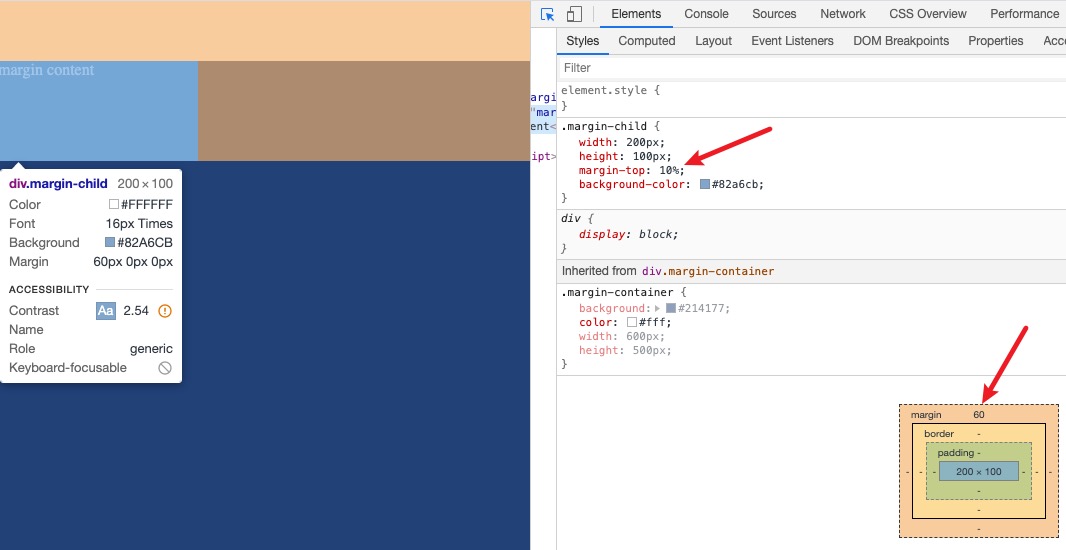
As shown, the child’s margin-top is 60px, i.e., 600 × 10%. padding-top behaves similarly.
Notes
- padding and margin support percentages, but border does not
- the percentage is based on the container width (parent width), not the element’s own width
Why This Design
Beyond remembering this niche detail, it’s worth understanding why it’s designed this way. I checked some references [#Oh Hey, Padding Percentage is Based on the Parent Element’s Width], and the explanation is roughly as follows:
- If percentages were based on the container’s height, we’d hit a circular dependency: the container’s height depends on the heights and margins of its children, and if those margins depend on the container’s height, it’s unsolvable. Browser width and height behave differently: width is finite and determinable, while height can be effectively unbounded.
- Basing it on the element itself would violate the broader design consistency. For example, font-size percentages are based on the parent element’s font size.
Final Thoughts
That’s my current understanding — corrections are welcome.


