Our team recently received a notice: the security team found .DS_Store files uploaded to the company CDN. We were asked to avoid committing this file.
The question is: why does this file affect security, and how do we avoid it? Here is a summary.
.DS_Store
First, understand the file. .DS_Store is a hidden file generated by macOS, storing custom attributes for files or directories.
For example, create an empty folder and a file, then browse via command line and you will see .DS_Store.

You can see it records disk paths and other info. If abused, it can be a security risk.
Note
- Even if you enable showing hidden files on Mac, Finder still will not display .DS_Store. You need to use the command line or an IDE with “show hidden files” enabled.
If the file is removed, does it affect macOS? Sources say no, so it is safe to delete.
Mitigation
Since .DS_Store poses a security risk, here are the measures:
- Use
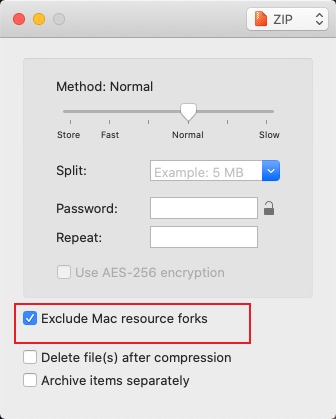
.gitignoreto ensure it is not committed. - When sharing zip archives, .DS_Store may be included. I recommend Keka and enabling the option to exclude
.DS_Store. Note: macOS may regenerate .DS_Store as you modify folders.
Run this command so SMB/network shares do not create .DS_Store.
defaults write com.apple.desktopservices DSDontWriteNetworkStores -bool TRUERun this command to delete all .DS_Store files under the current folder.
find . -name ".DS_Store" -print -deleteIn addition, if you use tools to upload assets to a CDN, you can have those tools filter
.DS_Storeautomatically.
Final Thoughts
It is a small issue but worth paying attention to. Marked.


