During the 618 shopping festival, a friend recently asked me if it’s necessary to buy an Apple TV (ATV). I strongly recommend it! I need to admit that ATV has some usage barriers, but it’s really great—the experience completely beats domestic streaming boxes. Today, I’ll just write an article to share my experience using it.
Purchase Motivation
Although my home TV is a smart TV, the operating system is very sluggish with all kinds of annoying ads, and the remote control is inconvenient. I’ve bought several Xiaomi boxes before but was not satisfied with any of them. So I decided to just buy an Apple TV—after all, it’s part of Apple’s ecosystem, and the experience shouldn’t be bad.
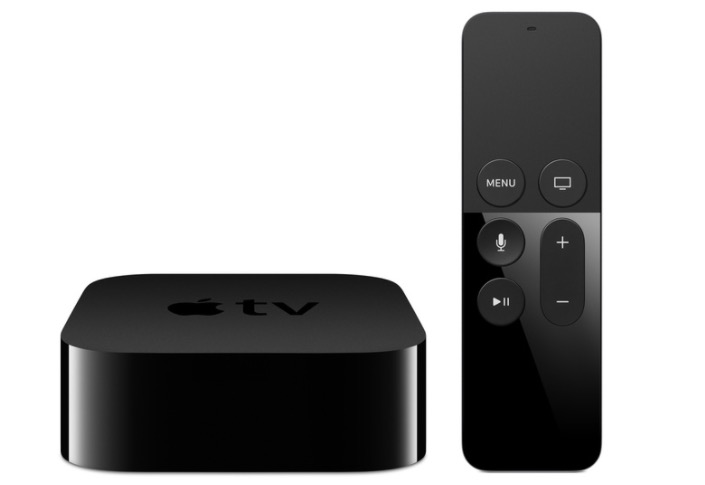
In the end, I bought an Apple TV 5th generation 4K 64GB A1842 on Xianyu (a Chinese second-hand marketplace) for 820 CNY. After using it for a few days, the experience has been very good.
Note: Currently, the Apple TV 7th generation is out, but models from the 5th generation onwards are all 4K. Buy according to your needs; the principle is to buy new if you can, but older models work too.
Purchase Advice
US version is the best. The Hong Kong version has a British-style plug and requires a converter. There is no Chinese mainland version of Apple TV.- I personally think TV devices have a very low update frequency and the configuration is sufficient. You don’t need the latest model—just get what’s within your budget and meets your needs. Of course, models before the 5th generation are not recommended.
Some Barriers to Entry
Apple TV isn’t very popular in China, and I think the biggest issue is the usage barriers.
- You need an
international Apple ID. If you need to pay for some apps in the future, you’ll also need to buy gift cards to solve payment issues.- When logging in with a Chinese mainland Apple ID, the App Store won’t be available, and the main usable feature is just AirPlay.
- A US Apple ID cannot enable Chinese Siri unless it’s for regions like Taiwan. However, Siri is very weak, so it’s not a big loss.
- Network issues need to be solved by yourself.
- You need to have an iPad/iPhone or other Apple devices to solve input operation problems, such as logging in with passwords. Therefore, if you don’t have other Apple ecosystem devices, there’s no need to buy an Apple TV.
Accessories
ATV accessories are relatively simple.
- Apple TV remote control sleeve, Apple TV protective case, remote control silicone sleeve.
I personally don’t recommend buying a protective sleeve for the set-top box.
Setup Recommendations
Recommended Apps to Install
The main apps I currently use are:
YouTube (YT)
- Recommended to purchase a Premium membership.
- The TV version doesn’t require a separate payment, which is much better than domestic platforms like iQiyi and Tencent Video—it’s much more honest.
Infuse
- Accesses local NAS resources.
- Alibaba Cloud Disk is great; I recommend using them together.
Miao
- A third-party client for Bilibili.
- Paid app, $5.99 in the US App Store.
- If you can’t find it in non-Chinese App Stores, pay attention to the re-listing time to purchase. Price: $6. More information: https://paladinfeng.notion.site/140462eaa3134ff68909102cb2b37e32. Official Telegram channel: https://t.me/miaoproject.
- Paid app, $5.99 in the US App Store.
- Views live TV channels like CCTV, requires manual addition of live broadcast sources.
- Free sources: such as https://github.com/YueChan/Live/tree/main.
- Paid sources: such as Xianyu/Taobao.
Synology NAS
- Synology’s official client, can access local network or external NAS resources. Here I use it to access some external NAS resources. If your NAS has WebDAV enabled, I still recommend using Infuse for a better experience; if not, this app works.
Of course, besides these apps, the most recommended is AirPlay. For example, if you find movie resources on your iPhone/iPad, you can directly AirPlay them to your TV to watch. This way, you no longer have to worry about not having resources or annoying video app ads.
Settings
- Update the system to version 16+, enable Chinese Siri. Some apps like YouTube can use it.
- Log in with multiple accounts (Chinese mainland/ international). When downloading apps, just switch accounts.
Current Experience
I’ve been using it for a few years now and have the following impressions:
- The TV/remote control experience is excellent. Xiaomi has only learned the superficial aspects and is far behind. Of course, Xiaomi’s products are cheaper.
- Using your phone’s remote to enter long text is very convenient, or you can use your phone directly as a remote control.
- AirPlay is really great.
For Apple fans, I highly recommend buying it.
Apple TV Internet Access Issues
Apple TV has the ability to access the external internet, which is convenient for using resources. There are three main methods:
- Install a client on Apple TV.
- Solve it at the router level.
- Enable remote device connection on Mac/iPhone and change the network settings’ gateway on Apple TV.


