I spent the last two weeks developing WeChat Mini Programs. Their code style needs matching tooling, and the setup differs slightly from general web projects. Notes below.
Where Config Files Live
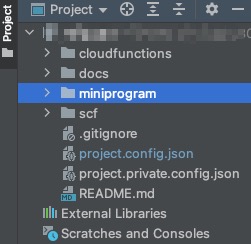
A typical Mini Program project looks like the following, so the root for package.json, ESLint, and other configs is under miniprogram, not the project root.
ESLint
.eslintignore
node_modules
miniprogram_npm
**/*.wxml
Notes
- Treat WXML as HTML and exclude it so ESLint rules don’t flag those files.
.eslintrc.js
globals: {
    App: true,
    Page: true,
    Component: true,
    Behavior: true,
    wx: true,
    getApp: true,
    getCurrentPages: true,
    __wxConfig: true,
  }
Declare Mini Program globals so the IDE doesn’t complain with eslint --no-undef.
.prettierrc.js
module.exports = {
  printWidth: 120,
  tabWidth: 2,
  useTabs: false,
  semi: true,
  singleQuote: true,
  quoteProps: 'as-needed',
  trailingComma: 'es5',
  bracketSpacing: true,
  arrowParens: 'always',
  htmlWhitespaceSensitivity: 'css',
  endOfLine: 'lf',
  overrides: [
    {
      files: '*.wxml',
      options: {parser: 'html'},
    },
    {
      files: '*.wxss',
      options: {parser: 'css'},
    },
    {
      files: '*.wxs',
      options: {parser: 'babel'},
    },
  ],
};
Assign different parsers to WXML/WXSS to keep formatting correct.
lint-staged
  "lint-staged": {
    "**/*.{js,wxs}": [
      "eslint --fix"
    ],
    "**/*.{wxml}": [
      "prettier --write"
    ]
  }
Run ESLint for JS/WXS and Prettier for WXML.
Note: ESLint includes the Prettier plugin in this setup, so JS files still go through Prettier—no separate command needed above.
Final Thoughts
Code style is more than a consistent look; it encodes best practices that prevent common mistakes. Treat it seriously.

