I stayed on Hexo 3.x for a long time because upgrading theme‑next was a hassle. RSS errors turned out to be version‑related, so I bit the bullet and upgraded to simplify future maintenance.
Here’s a brief description of the upgrade process:
Upgrade Hexo/NexT
Delete the next folder, then download the new theme
git clone https://github.com/theme-next/hexo-theme-next themes/nextNew NexT supports external config/custom styles outside the theme dir, making upgrades easier. Create
next.ymlandstyles.stylin the project for customization.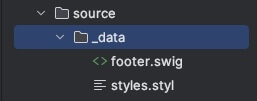
The new theme supports the
Gitalkcomment system, so I switched from Disqus, which will improve loading speed and visitor experience.
Gitalk integration
Integration is simple:
- Visit GitHub to create an application
- Obtain the Client ID and Client Secret, then fill in these details along with the repository name and GitHub account in the configuration file
- I pointed the repository to my blog for easier comment management
Notes
- Fill in the address/callback address with the online address
- The admin_user configuration allows administrators to directly create issues for the corresponding page when they visit
- The script will automatically create an issue and add the label
gitalkand the ID
Final Thoughts
- Currently, the new version of hexo+theme seems to improve build efficiency
- The new configuration scheme supports custom folders, making future upgrades and maintenance easier


