When looking up command tool parameters, we often use
--help, such asrsync --help. Alternatively, we can use the man command, likeman rsync. So what’s the difference between them, and how should we choose?
Differences
The man command provides comprehensive usage manuals for all commands available in the system, supported on both Linux and Mac
- Non-system commands are generally not available, such as
man java - “man” is short for manual, meaning help documentation
- Non-system commands are generally not available, such as
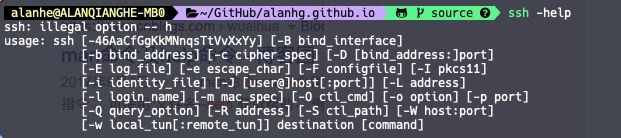
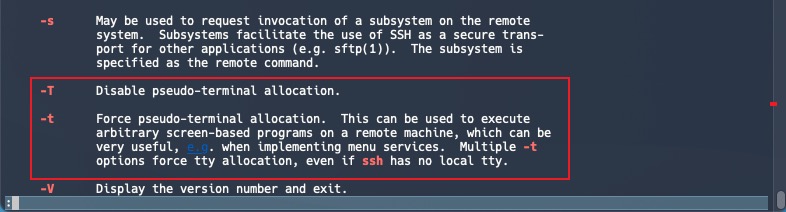
--helpis a parameter provided by each command itself, used to print command usage instructions, but some commands may not provide it, such assshSSH has a special case where the command’s own parameter descriptions are quite brief (like the t parameter without detailed explanation), while man provides much clearer descriptions
Usage Recommendations
For system commands, prioritize using man to view documentation
For non-system commands, use the command’s own
--helpdocumentation
Final Thoughts
Understanding the distinction between --help and man commands is essential for efficient command-line usage. While --help provides quick, command-specific information, man offers comprehensive system-wide documentation. The choice depends on whether you’re working with system commands (prefer man) or third-party tools (prefer --help). Both tools serve complementary purposes in the Linux/Mac command-line ecosystem.

