I have been working with Linux more recently and realized my understanding of file permissions was lacking. I summarized it here.
Permission basics
When you run ll in the terminal, you can see permissions for each file.
For example: drwx------ 7 lighthouse lighthouse 4096 Jul 12 12:00 lighthouse
The first letters indicate permission info. In plain terms, they define permissions for me, my group, and others.
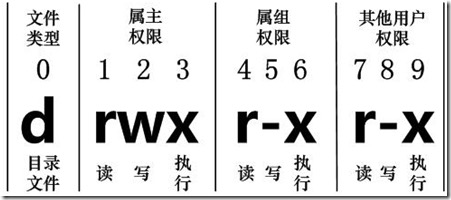
Permission checks
Given a file’s permission bits, how do you check whether a user has access?
Get the user’s UID/GID. For example, run
idand get info for userlighthouse.uid=1000(lighthouse) gid=1000(lighthouse) groups=1000(lighthouse)Get the file’s UID/GID and permission bits, e.g., the
lighthousedirectory.# Show uid, gid ll -n drwx------ 7 1000 1000 4096 Jul 16 15:21 lighthouse # Show owner, group names ll drwx------ 7 lighthouse lighthouse 4096 Jul 12 12:00 lighthousePermission logic
- If uid === 0, the user is root and has full permissions.
- If user uid === file uid, the user is the owner, so use owner rwx.
- If user is not owner but in the group, use group rwx.
- Otherwise, use other rwx.
Notes
- root is special and its UID is fixed.
- uid === 0 superuser may not be unique.
Example
Even if root is neither owner nor in the same group and the folder has no permissions for others, root can still read/write/execute. This matches the logic above.
Final Thoughts
Learn Linux well. Keep going.


