Proxies come up often. Understanding proxy settings helps troubleshoot network issues. Here’s a summary based on work experience.
May contain errors; corrections welcome.
What is a proxy?
Proxy (English: Proxy), also known as network proxy, is a special network service that allows one terminal (usually a client) to connect indirectly to another terminal (usually a server) through this service. Some network devices like gateways and routers have network proxy functionality. It is generally believed that proxy services help protect the privacy and security of network terminals and can, to some extent, prevent network attacks.
From WIKI
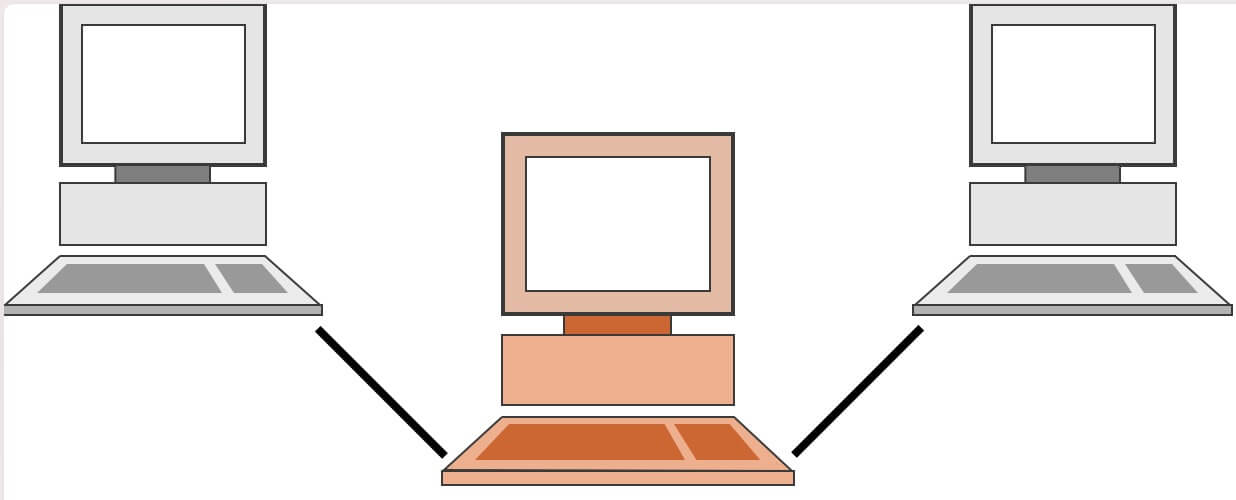
Common proxy tools
We often encounter these categories; all play a proxy role:
Common Proxy Software

With these proxy tools, we can access internal network services or blocked sites like Google/GitHub
Example
A rule-based tunnel in Go. From Clash Repo
Built-in Proxy in Company OA


Routes requests to different addresses based on predefined patterns; also commonly used for packet capture
Example
whistle (pronounced [ˈwɪsəl], pinyin [wēisǒu]) is a cross-platform web debugging proxy tool implemented in Node.js. Similar tools include Fiddler on Windows. It is mainly used to view and modify HTTP, HTTPS, and WebSocket requests and responses, and can also be used as an HTTP proxy server. – From Whistle Official Website
Nginx/Envoy

Proxies one or more services, accessible via a domain/IP
Example
Advanced Load Balancer, Web Server, & Reverse Proxy – From Nginx official website
- HTTP Agent/Server
An
Agentis responsible for managing connection persistence and reuse for HTTP clients. It maintains a queue of pending requests for a given host and port, reusing a single socket connection for each until the queue is empty, at which time the socket is either destroyed or put into a pool where it is kept to be used again for requests to the same host and port. Whether it is destroyed or pooled depends on thekeepAlive[option](dfile:///Users/alanhe/Library/Application Support/Dash/Versioned DocSets/NodeJS - DHDocsetDownloader/15-11-0/NodeJS.docset/Contents/Resources/Documents/nodejs/api/http.html#http_new_agent_options).From Node.js HTTP Module - Agent Documentation
These are all proxy-related services, and the proxy technologies behind these categories are mainly the following
System proxy
What is the system proxy?
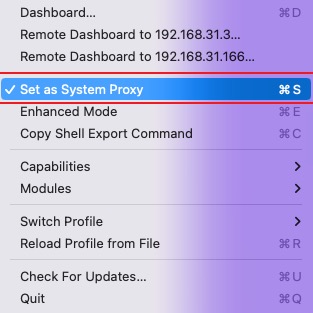
Screenshot of a proxy’s system proxy toggle
The app itself starts a local proxy service that can accept
Socks/HTTP/HTTPSprotocol proxies. For HTTP/SOCKS, it exposes proxy protocol services on different ports.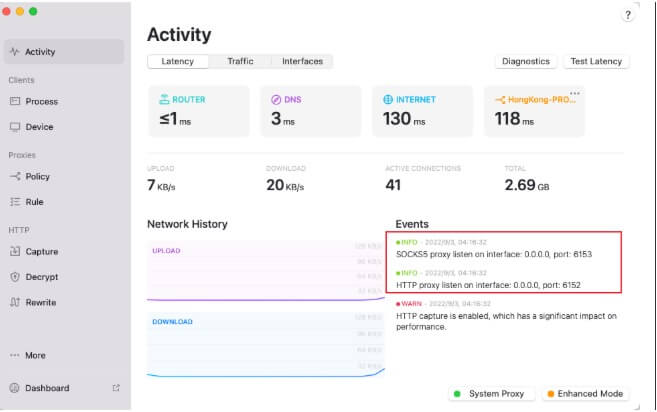
When
System Proxyis enabled, it modifies the computer’s proxy settings.The system proxy can be enabled as follows:
When viewing the network connection - proxy section in system settings, you’ll see the following proxy server configuration:
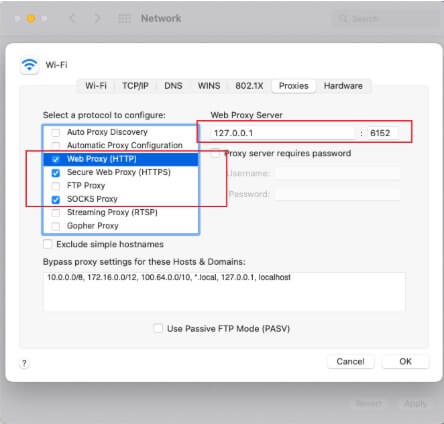
After enabling
- When any app that respects system proxy settings makes a request, it will use the configured proxy service.
- Most proxies also provide a bypass whitelist to exclude specific IPs/domains (like localhost) from proxying.
- When the proxy app is closed, the system proxy settings are automatically disabled and cleared.
Manually setting the system proxy
The above describes how apps automatically configure system proxies. System proxy settings can also be manually edited, so you can configure them yourself.
In frontend development, Whistle proxy service is commonly used, but Whistle itself does not modify system proxy settings. This means if we want certain webpage requests to go through Whistle proxy, it won’t work. The usual approach is to configure browser proxy settings, but another method is to set up system proxy.
By manually setting Whistle proxy service as the system proxy, we can solve this. For example, if Whistle’s proxy address is 127.0.0.1:8899, we can change the HTTP/HTTPS proxy address in system settings. This way, Safari webpage access will go through Whistle proxy.

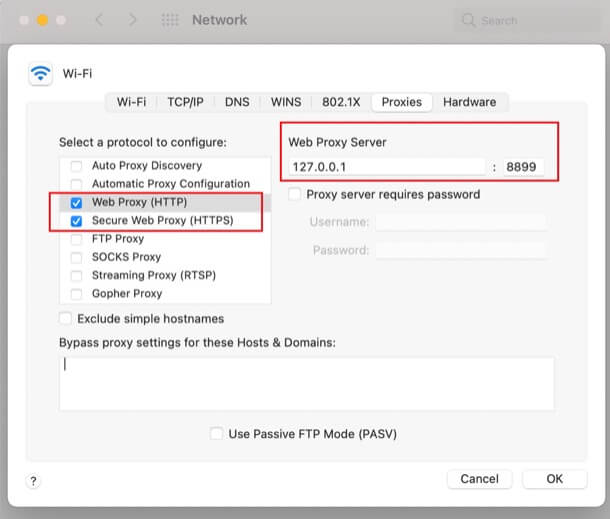
Note: Whistle does not expose SOCKS proxy service by default. If you need to use it, you need to configure it separately with parameters, for example w2 start --socksPort 8900.
Some apps ignore the system proxy
Most apps respect system proxy settings, but many apps ignore them, such as Mail, iTerm2, Terminal
- After enabling the proxy, Mail on Mac still can’t send/receive Gmail because it ignores system proxy settings. System proxy configuration won’t fix this issue, and you can’t capture its traffic with proxy tools.
- Some proxy tools solve this problem with
Virtual Network Interface (TUN), which works at a lower network layer. - The issue of apps ignoring system proxies is mainly limited to macOS; iPhones don’t have this problem.
Mobile System Proxy?
Mobile devices support manual HTTP proxy configuration per network. This only affects HTTP-based operations like browser web pages; apps like WeChat won’t use the proxy for messaging.
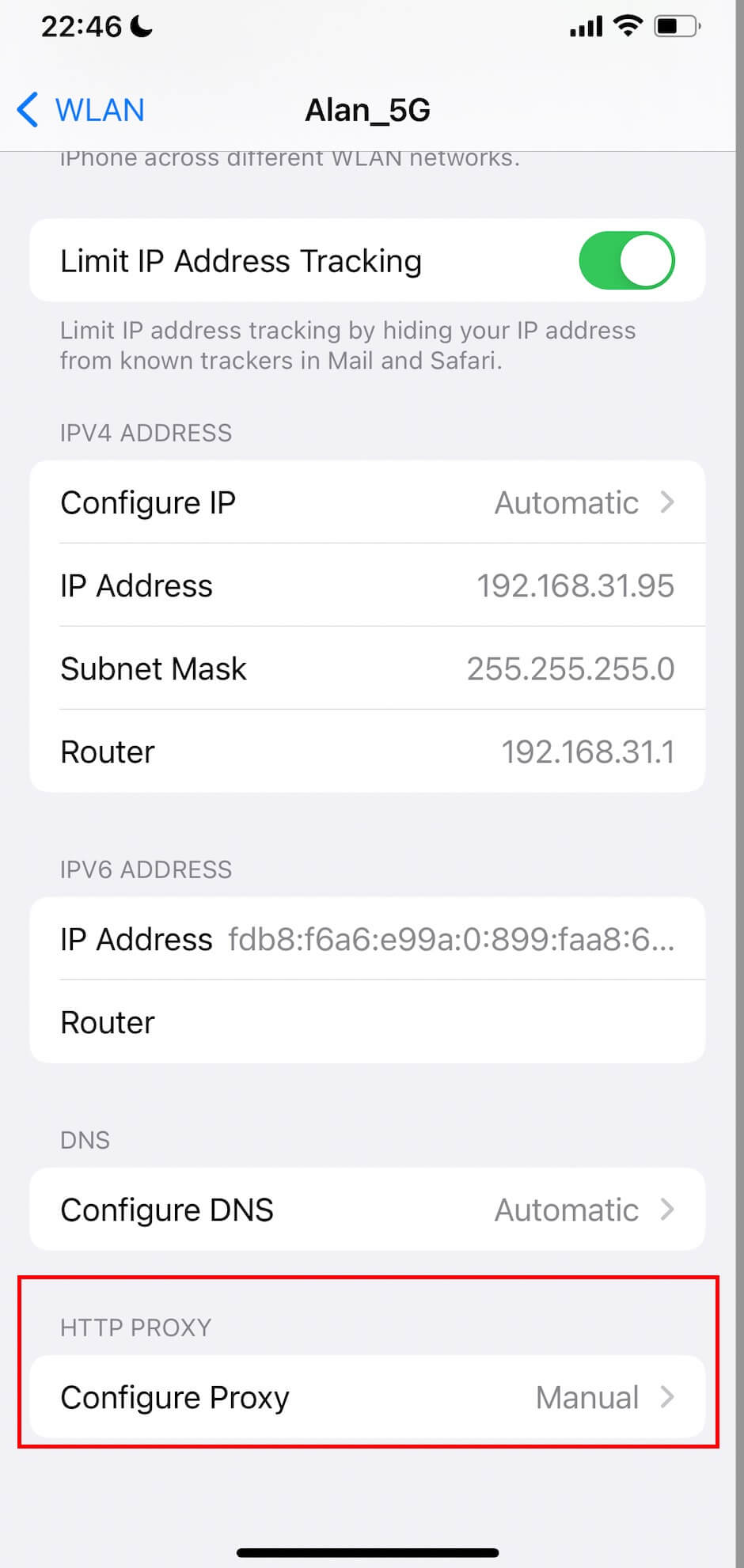
To route all mobile app traffic through a proxy, the common solution is to enable a VPN with a virtual network interface.
Virtual Network Interface (TUN)/Transparent Proxy
Many companies provide OA (Office Automation) clients. If you check the network settings, you’ll find the client doesn’t modify system proxies, but you can still access Google or internal company networks after logging in. This is because the client uses a transparent proxy via a virtual network interface. With the virtual interface enabled, you can access external networks without a system proxy.
Virtual network interface creation
You can see this virtual interface using
ifconfigin the terminal; it’s destroyed when the OA connection is closed.
System routing table configuration ensures requests are sent through the virtual network interface.
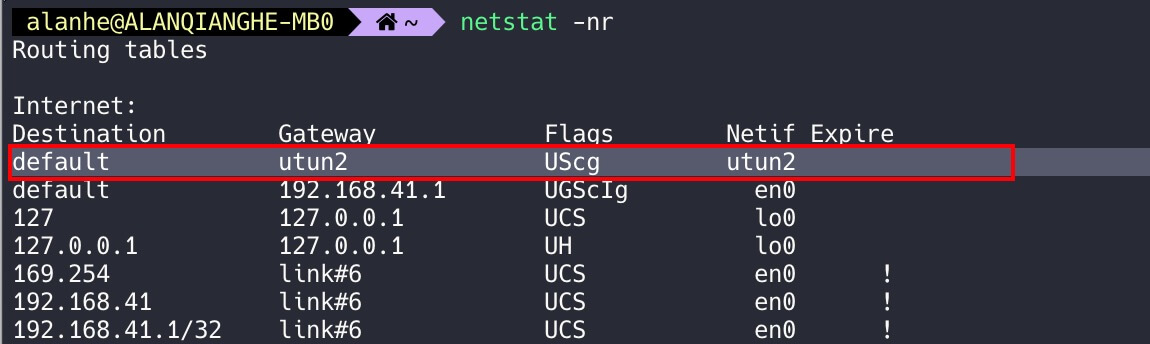
- This shows that virtual network interfaces and system proxies operate at different levels, so they can coexist.
Browser Proxy
Browser proxy is at the application level - it ensures all requests from that browser use the proxy. System proxy is system-wide, affecting most apps.
Some browsers like Chrome/Firefox support separate proxy settings, which is why they have proxy plugins like SwitchyOmega.
Safari doesn’t provide app-level proxy settings, so it always uses the system proxy.
Browser proxy => System proxy, forming a proxy chain?
Access logic: target webpage <= browser proxy <= system proxy
Experiment
Suppose the system default network cannot access webpage A, but through system proxy configuration, access to A is supported. However, if Chrome’s proxy configuration uses a proxy service that does not support accessing A, then Chrome cannot access A. Of course, if the Chrome plugin’s proxy service is a local proxy service and itself goes through the system proxy, then it can still access A.
Conclusion
Browser proxy has higher priority than system proxy and does not form a browser proxy => system proxy chain.
HTTP Agent
Agent manages pooled TCP connections. Normally, a client establishes a new TCP connection for each HTTP request and closes it after getting the response. Since TCP handshake is relatively slow, reusing connections for multiple HTTP requests/responses improves performance. Agent’s role is to reuse TCP connections.
Practical Proxy Examples
Wallet gRPC Communication
grpc-web => gRPC
...
location / {

            # SSL
            grpc_set_header     Content-Type application/grpc;
            grpc_pass    grpcs://$http_x_grpc_node;

            grpc_ssl_certificate /var/www/ssl/$http_x_grpc_ssl_cert;
            grpc_ssl_certificate_key /var/www/ssl/$http_x_grpc_ssl_cert_key;
          }
...
Whistle-Safari Packet Capture
As mentioned above, Safari does not have browser proxy support and completely relies on system proxy. Therefore, a simple way is to configure the HTTP proxy in system proxy settings to Whistle.
Mobile App Request Capture
As mentioned earlier about mobile system proxies, we have two main solutions:
Configure the network proxy to use a desktop proxy like Whistle’s HTTP proxy. This can capture traffic from WeChat Mini Programs, mobile web pages, and apps.
Enable VPN to intercept all app network traffic.
Dynamic Proxy - Penetrate to Access Target Machine’s Internal Web
Example
const {Agent: HttpAgent} = require('http');
const {connect: tlsConnect} = require('tls');

class SSHAgent extends HttpAgent {
  constructor(connectCfg, agentOptions) {
    super(agentOptions);

    this._connectCfg = connectCfg;
    this._defaultSrcIP = (agentOptions && agentOptions.srcIP) || 'localhost';
  }

  createConnection(options, cb) {
	...
    if (Client === undefined)
      Client = require('ssh2/lib/client.js');

    const client = new Client();
    let triedForward = false;
    client.on('ready', () => {
      client.forwardOut(srcIP, srcPort, dstIP, dstPort, (err, stream) => {
        triedForward = true;
        if (err) {
          client.end();
          return cb(err);
        }
        stream.once('close', () => client.end());
        cb(null, decorateStream(stream, HttpAgent, options));
      });
    }).on('error', cb).on('close', () => {
      if (!triedForward)
        cb(new Error('Unexpected connection close'));
    }).connect(this._connectCfg);

    ...
  }

}


axios({
      headers,
      baseURL: `http://${codeServerProxifier.url}`,
      method: req.method,
      url,
      data: bodyData,
      httpAgent,
      maxRedirects: 0,
      responseType: 'arraybuffer'
    })
Additional Notes
Proxy Protocol vs Request Protocol
Proxy protocol and request protocol are different. HTTP proxy protocol can proxy HTTP, HTTPS, and WebSocket.
- Whistle exposes a proxy protocol + port, acting as an HTTP proxy server.
- HTTP/SOCKS proxies on Mac are categorized by request protocol. If you only configure HTTP proxy, it can only proxy HTTP and compatible protocols like WebSocket.
Socks vs HTTP
- Socks is compatible with other network protocols like HTTP
- For example, if the Chrome-Omega plugin switches the proxy protocol from HTTP to Socks, pointing to Whistle, packet capture on the Whistle side still works normally.
- Conversely, HTTP is not compatible with Socks
- Socks, like HTTP, is a protocol and also has versions, such as Socks4, Socks5
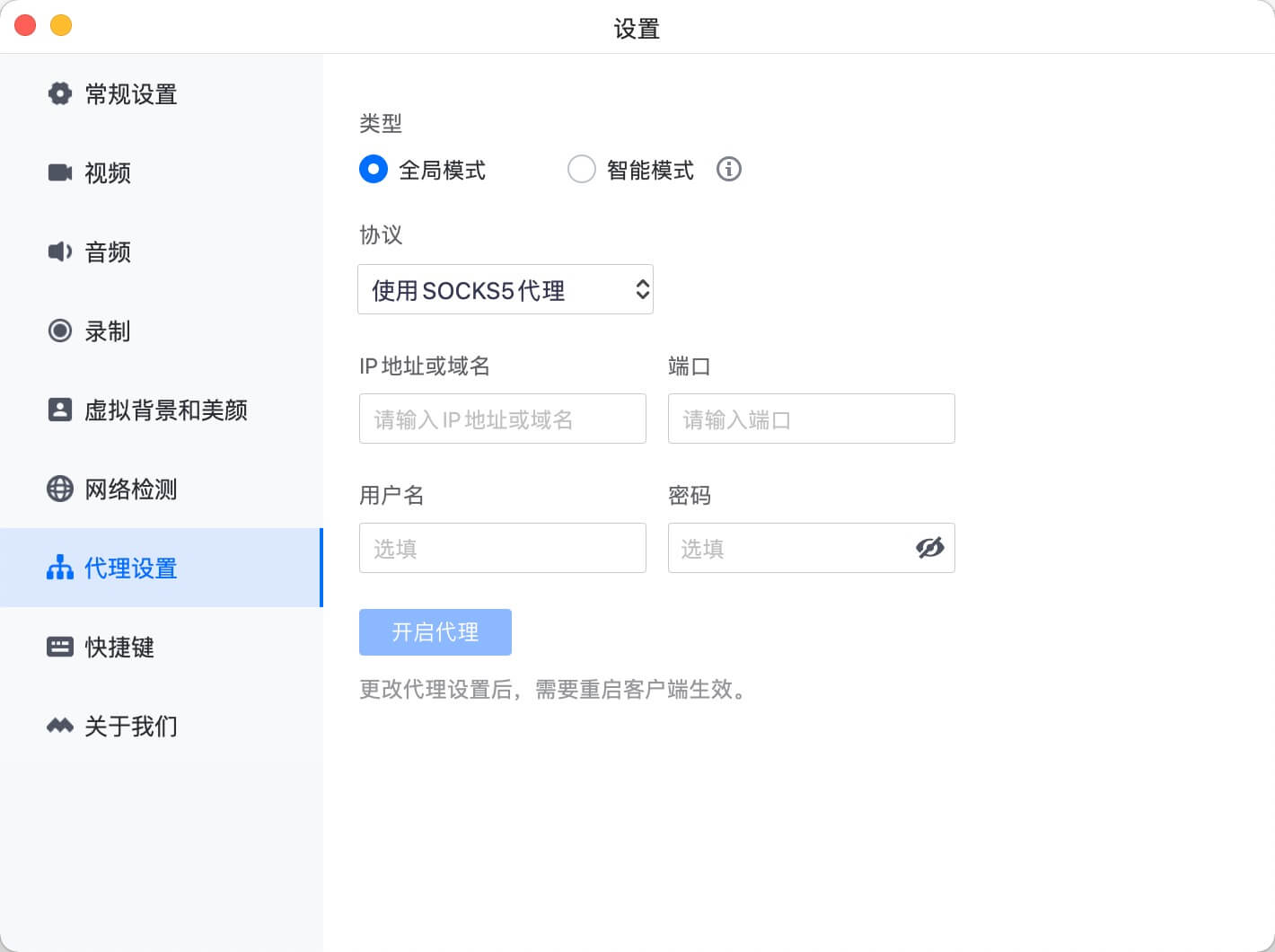
Many Apps Provide Proxy Settings
- Tencent Meeting
- WebStorm
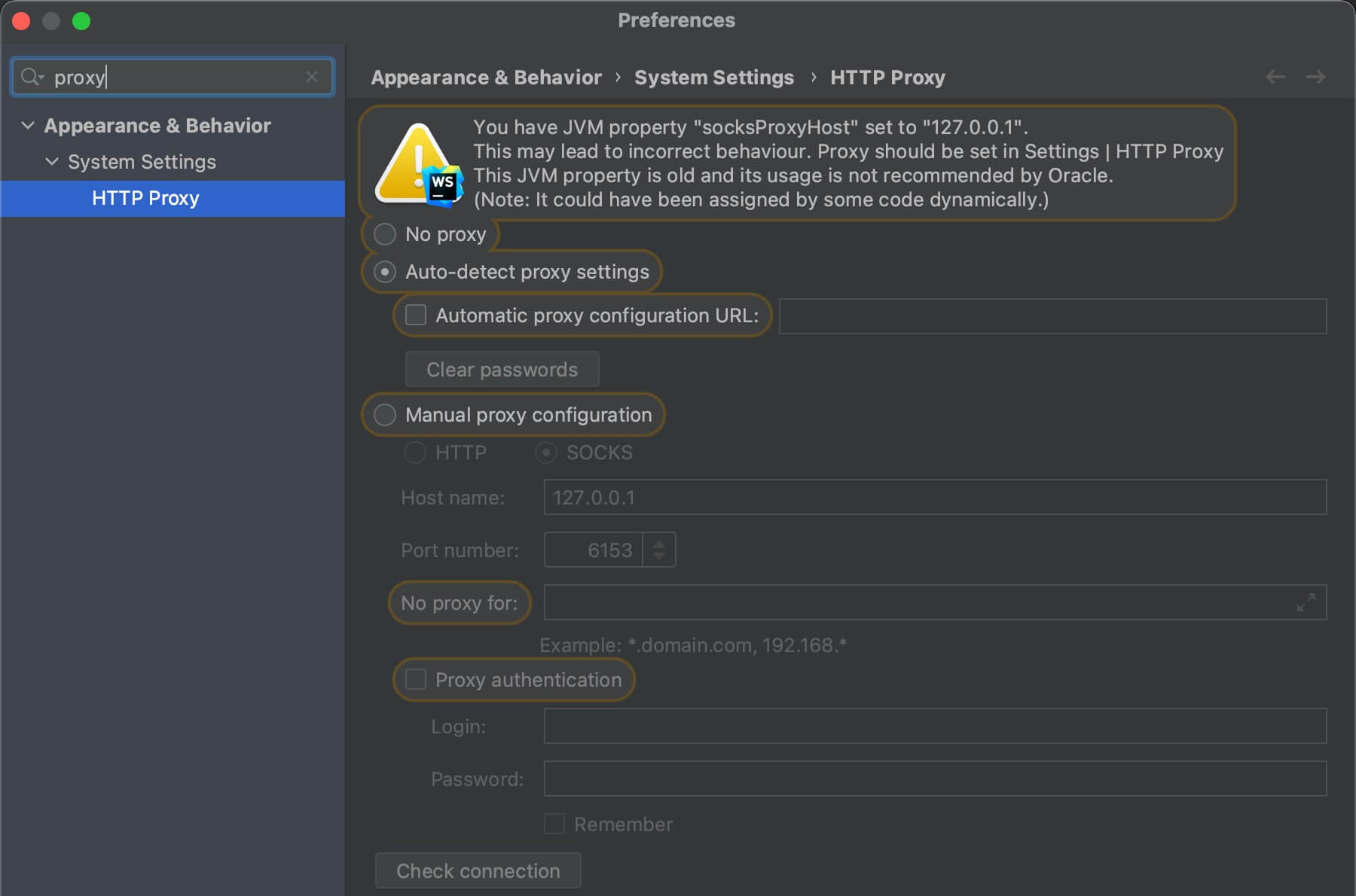
- Others: Spotify, WeCom (Enterprise WeChat), WeChat, Alfred, etc.
TUN (Tunneling)
TUN is a type of virtual network interface.
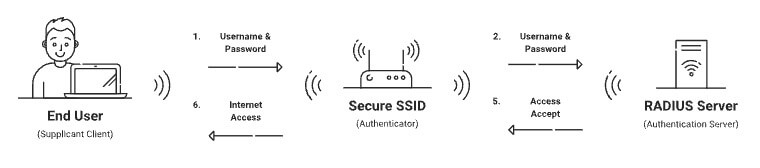
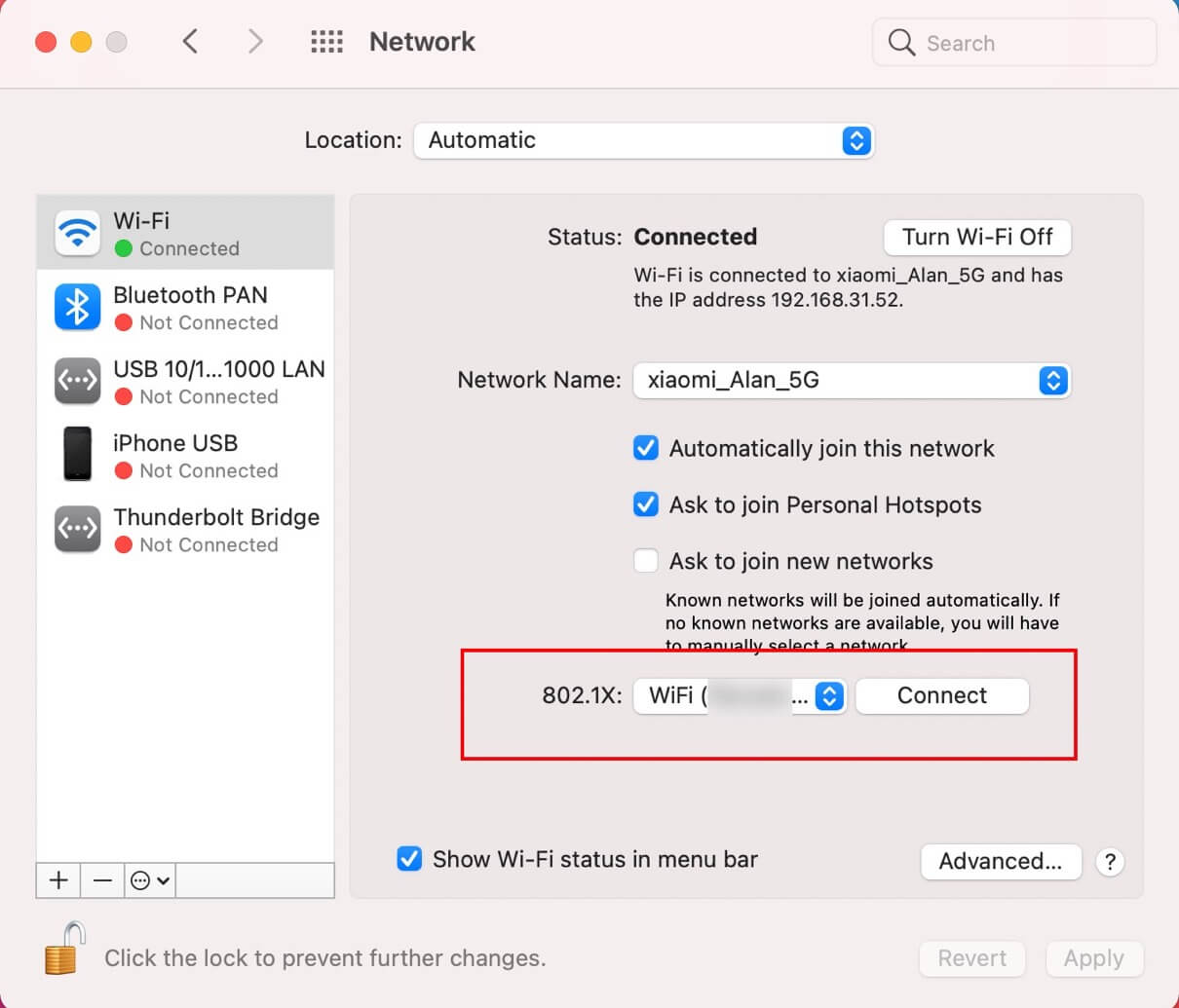
802.1X Authentication - Security
When connecting with the OA client, you’ll see an 802.1X connection. This is because the client uses 802.1X authentication to ensure the security of the target network.
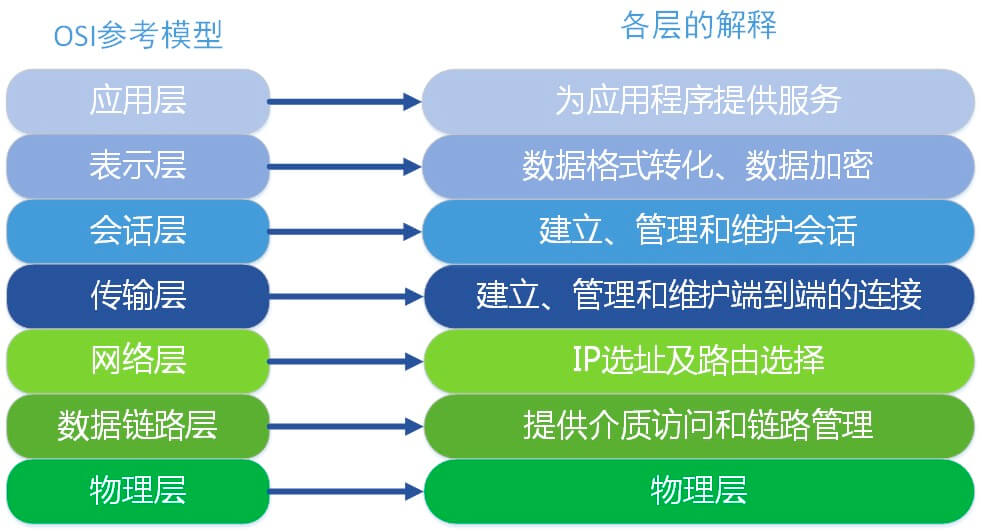
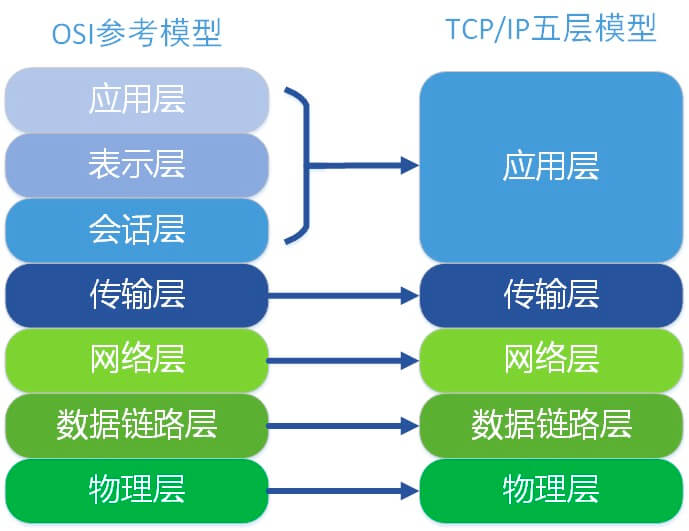
OSI TCP/IP
- http/websocket
- grpc/grpc-web
- socks
Final Thoughts
Proxy is a technology used in various applications like network analysis and frontend development. Understanding proxy issues is quite useful.


