While staying in Hubei recently, I ran into an issue accessing GitHub — SSH login kept failing even though my public key was configured correctly. It turned out to be DNS pollution. Here are the notes and fix.
Network Environment
- China Telecom, Xianning, Hubei
Test Script
If git operations prompt for a password for git@github.com, the SSH login failed. Use the following to test SSH login status:
ssh -vT git@github.com
The logs showed public key verification failing. First suspicion: the key wasn’t configured correctly on GitHub. After confirming it was correct and the failure persisted, DNS pollution became the likely culprit.
Switching the terminal to use a proxy made the login succeed, confirming the diagnosis.
Analysis
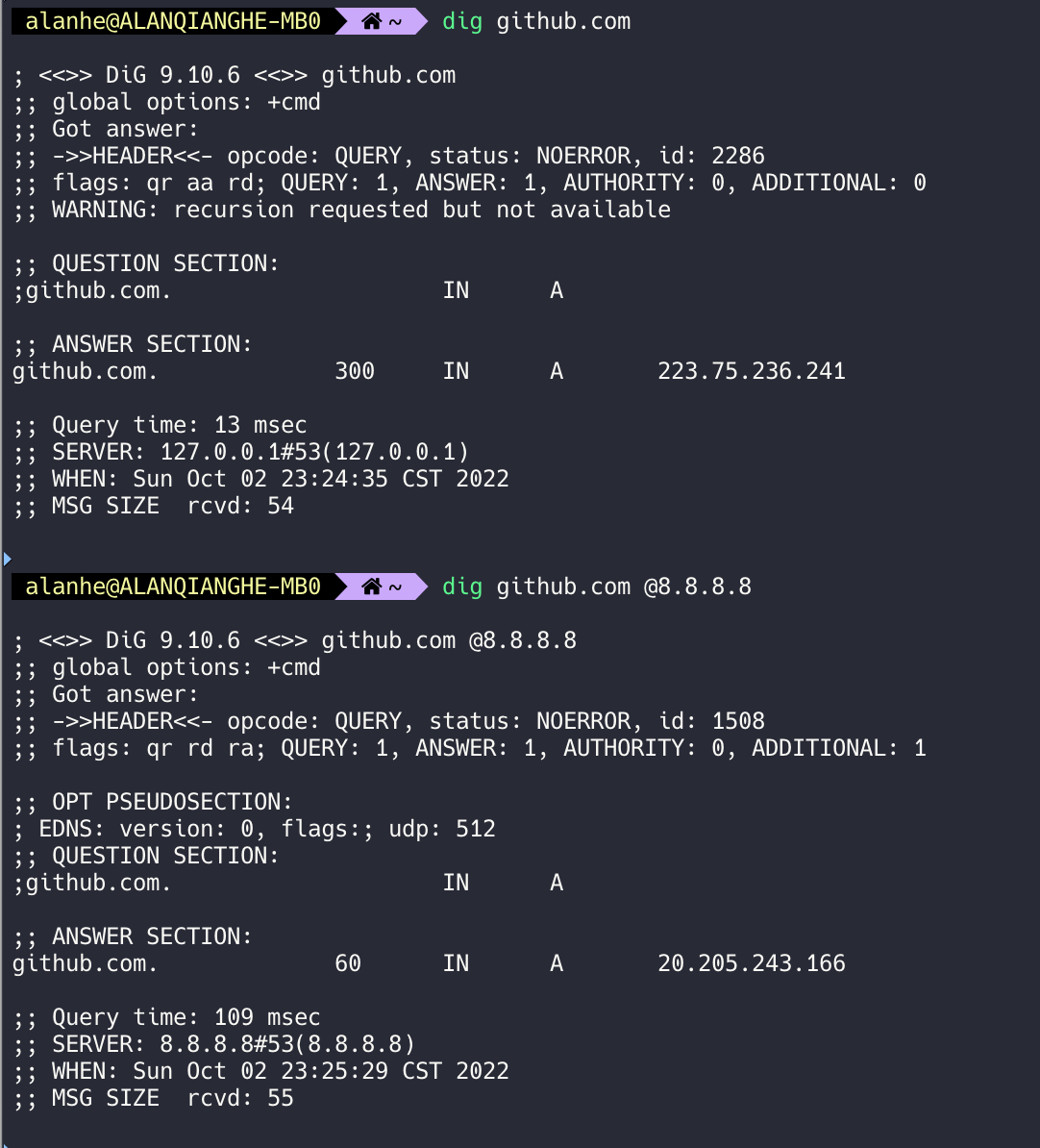
Using dig with the default DNS server vs Google DNS (8.8.8.8) showed the default DNS returned 223.75.236.241, which is not a GitHub web address. The correct IP was 20.205.243.166; visiting it in a browser redirected correctly to GitHub.
Workaround
Since this was a temporary issue, I modified the hosts file and added:
20.205.243.166 github.com
Alternatively, configure your terminal to use a proxy.
Final Thoughts
Accessing GitHub/Google cleanly can be tricky at times — consider it practice in troubleshooting.


