SSH Login Failure — Connection reset by peer

Troubleshooting kex_exchange_identification: read: Connection reset by peer during SSH login, with likely causes and checks.

Oct 20, 2022 · 1 min read · 102 Words · -Views -Comments · Programming
WebShell
Read with AI

Choose an AI assistant

ChatGPT Open in a new tab with the article link and prompt
Claude Copy the prompt, then open Claude

Open Claude
Trouble reading the article?

If the prompt is missing, copy the full prompt below into your AI assistant. If the AI cannot read the article, paste the visible passage you want to discuss and add your question.

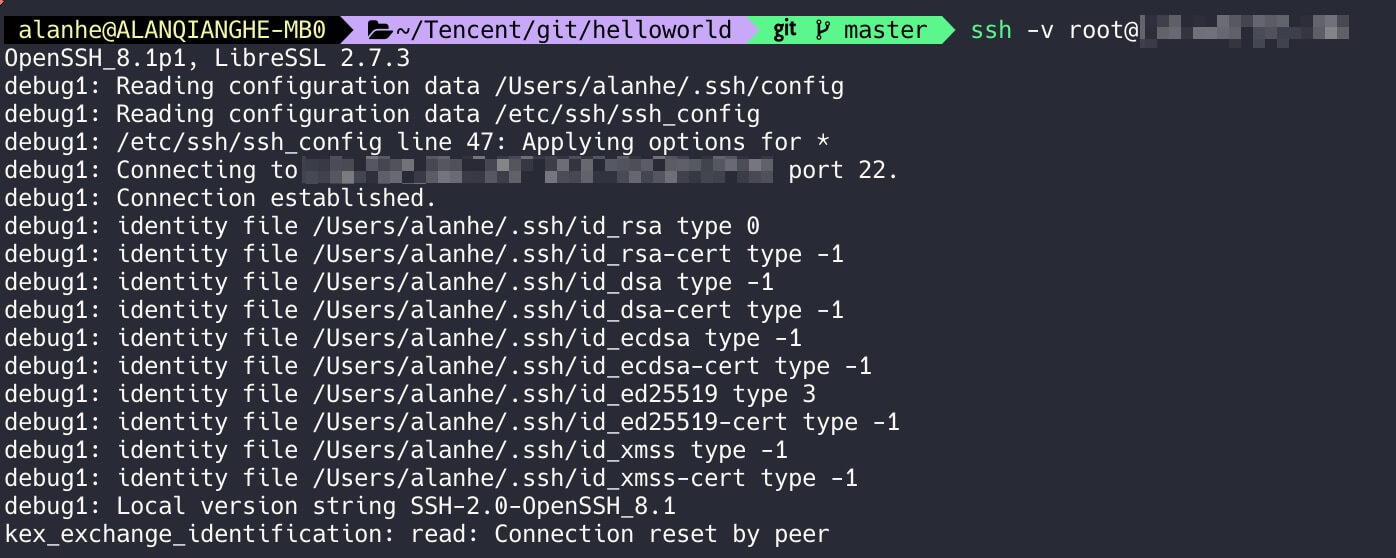
If SSH login fails with kex_exchange_identification: read: Connection reset by peer, try the following checks.

When using ssh, the -v flag prints debug logs. In the logs below, the server never sends anything; if the first step succeeded, you would see the remote protocol version.
https://static.1991421.cn/2022/2022-10-20-203719.jpeg

Likely places to check:

  1. /etc/ssh/sshd_config

    Verify the port is correct; it may not be 22. If you change the config, restart the service with service sshd restart.

  2. /etc/hosts.allow and /etc/hosts.deny

    By default these files are empty with no active rules; make sure nothing is blocking your client.

Note: editing the above files requires sudo or root privileges.

Authors
Developer, digital product enthusiast, tinkerer, sharer, open source lover
