Custom Terminal Background Images in WebShell

How WebShell implements customizable terminal background images using xterm.js with a transparent terminal layer and a styled sibling element.

Mar 6, 2023 · 1 min read · 89 Words · -Views -Comments · Programming
WebShell 🇨🇳 阅读中文版
Read with AI

Choose an AI assistant

ChatGPT Open in a new tab with the article link and prompt
Claude Copy the prompt, then open Claude

Open Claude
Trouble reading the article?

If the prompt is missing, copy the full prompt below into your AI assistant. If the AI cannot read the article, paste the visible passage you want to discuss and add your question.

WebShell recently added support for custom background images. Here’s the overall approach.

Architecture
https://static.1991421.cn/2023/2023-03-06-235223.jpeg

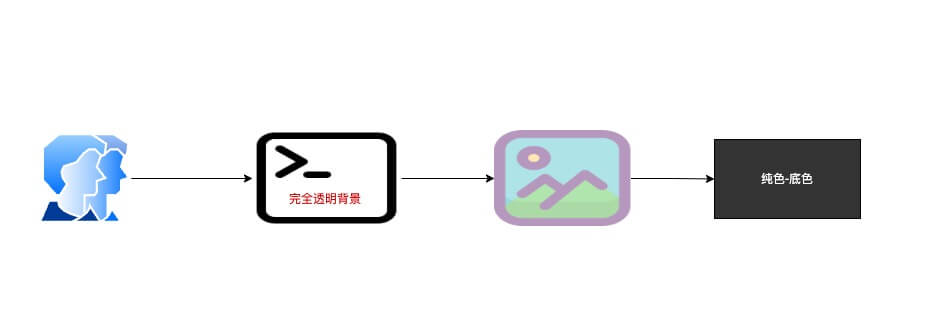
As the diagram shows, the implementation is roughly:

  1. xterm.js supports transparent backgrounds; set the terminal background to transparent.
  2. Add a sibling DOM element in front of the terminal and apply a background image to it via CSS. This becomes the visual “bottom layer” beneath the terminal, with opacity controlling transparency.
  3. Set the terminal’s parent element to a solid color without transparency.

With the above, you get a custom terminal background image with adjustable transparency.

Demo

Link

Authors
Developer, digital product enthusiast, tinkerer, sharer, open source lover
