I recently researched frontend image compression and summed it up here.
MIME
media type
<input type="file" id="selectImg" accept="image/*"/>
- For example, to restrict an upload picker so non-image files can’t be selected, use
image/*. - This restriction can be bypassed on Windows, so add stricter MIME checks in the submit logic/back end as well.
 if (!file.type.startsWith('image/')) {
      e.target.value = '';
      return;
    }
Compression methods
Dimensions
Reduce file size by lowering the pixel dimensions.
Quality
Lower quality by trading off detail and fidelity.
Format comparison
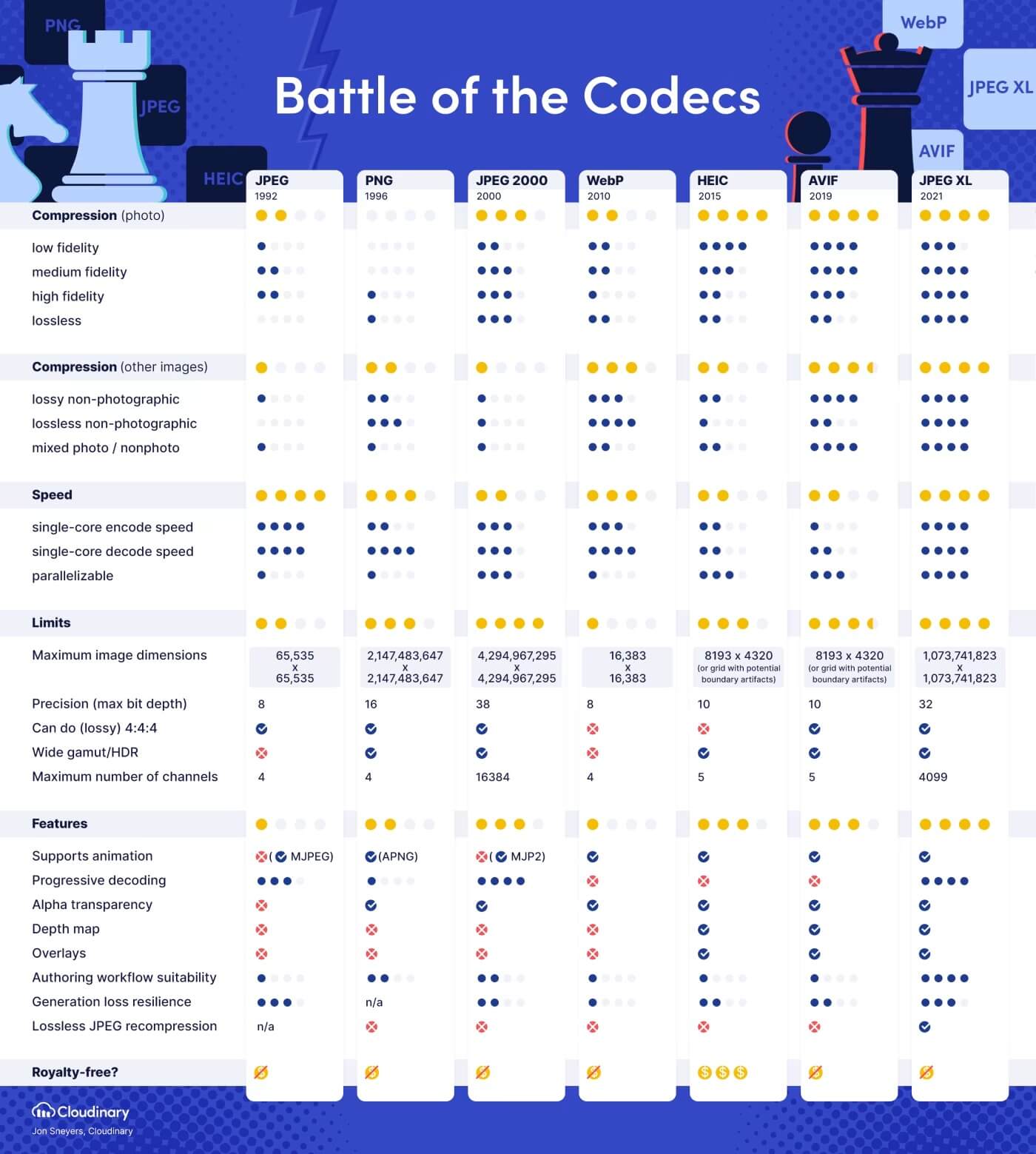
Compatibility
- JPEG 2000 by the JPEG group, the oldest of the JPEG successors, available in Safari
- WebP by Google, available in all browsers
- HEIC by the MPEG group, based on HEVC and available in iOS
- Unsupported by all major browsers
- AVIF by the Alliance for Open Media (AOM), available in Chrome and Firefox
- JPEG XL by the JPEG group, the next-generation codec
- WebP2 by Google, an experimental successor to WebP
Is frontend compression feasible?
- canvas
Compressor.js
 new Compressor(selectedImg, {
      strict: true,
      quality: 0.6,
      maxHeight: 2160,
      maxWidth: 3840,
      convertSize: 2000000,
      mimeType: 'auto',
      success(result) {

      },
      error(err) {
        console.log(err.message);
      },
    });
Gracefully fallback images
HTML ![]()
<picture>
  <source srcset="111.avif" type="image/avif">
  <source srcset="111.webp" type="image/webp">
  <img src="111.png">
</picture>
CSS background-image
There’s no great pure-CSS option today. Use JS to detect AVIF/WebP support and choose the right image at runtime.
function isAvifSupported() {
  return new Promise(resolve => {
      var image = new Image();

      image.onload = function() {
        resolve(true);
      };
      image.onerror = function() {
        resolve(false);
      };

      image.src = "data:image/avif;base64,AAAAIGZ0eXBhdmlmAAAAAGF2aWZtaWYxbWlhZk1BMUIAAADybWV0YQAAAAAAAAAoaGRscgAAAAAAAAAAcGljdAAAAAAAAAAAAAAAAGxpYmF2aWYAAAAADnBpdG0AAAAAAAEAAAAeaWxvYwAAAABEAAABAAEAAAABAAABGgAAAB0AAAAoaWluZgAAAAAAAQAAABppbmZlAgAAAAABAABhdjAxQ29sb3IAAAAAamlwcnAAAABLaXBjbwAAABRpc3BlAAAAAAAAAAIAAAACAAAAEHBpeGkAAAAAAwgICAAAAAxhdjFDgQ0MAAAAABNjb2xybmNseAACAAIAAYAAAAAXaXBtYQAAAAAAAAABAAEEAQKDBAAAACVtZGF0EgAKCBgANogQEAwgMg8f8D///8WfhwB8+ErK42A=";
    });
}
Beware: some @supports checks can be misleading. On macOS Big Sur + Safari 16, it “matched” but AVIF wasn’t actually supported, causing black screens.
Final Thoughts
Takeaways:
- Use AVIF/WebP when compatible; fall back as needed.
- Frontend can pre‑compress non‑animated formats when appropriate.

