I’ve been studying CLI tools and keep seeing different flag styles. Here’s what I’ve learned about conventions and differences.
Command structure
First, a common command structure:
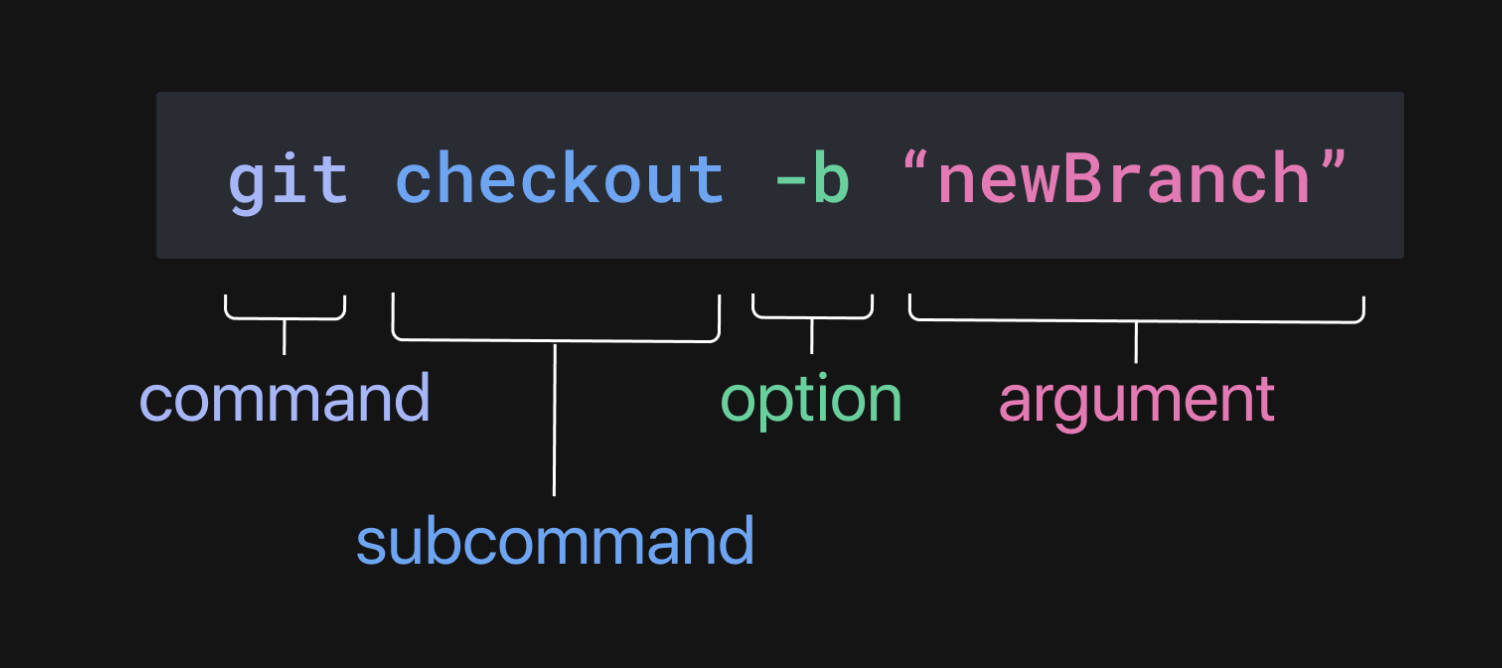
A few more points:
Some commands have both short and long formats for options. In the figure,
bdoesn’t have a corresponding long format, butfhas both-fand--force. Short and long parameters have the same effect; they’re just different ways of writing.Short flags can often be combined, but not always. For example,
git checkout -b newBranch -fcannot be combined intogit checkout -bf newBranch.Flags are case‑sensitive; some commands use uppercase flags.
Flags may take values using a space or
=depending on the CLI. Docker supports both:--name="doc-searcher"equals--name "doc-searcher".
-v, -V, –v
With the structure in mind:
-vis a short flag.--vis a long flag (though uncommon — most tools use names like--version).-Vis a short flag using uppercase.
Recommendations
Different tools vary, which adds learning cost. When building your own CLI, follow common conventions. See commander.js for a well‑adopted model.
- Use spaces to separate parameter values
- Use both short and long formats: short format as a single character, long format as a complete word
- Use lowercase for subcommands/parameters
Final Thoughts
- Following CLI conventions improves efficiency and avoids mistakes.
- Good CLI design lowers the learning curve.


