ChatGPT has been popular for a year now。It has also driven the use of SSE.
Here, I summarize my understanding of it.
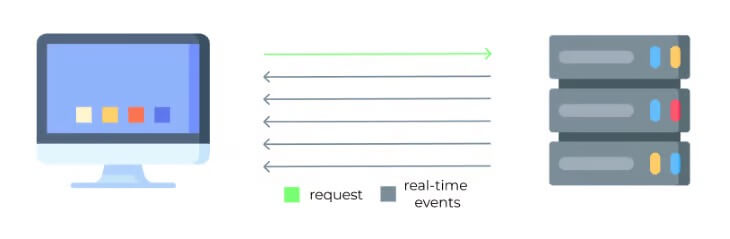
Advantages of SSE
- Uses the standard HTTP protocol, and not WebSocket. Relative to WebSocket, it has a smaller resource overhead.
- SSE transmits text data with simple overhead.
How to Use
const evtSource = new EventSource("sse.php"); evtSource.onmessage = (e) => { console.log(`message: ${e.data}`); };fetch('/api/openai/stream', { method: 'post', headers: { 'Content-Type': 'application/json;charset=utf-8', }, body: JSON.stringify({ messages }) }).then(res => { const reader = res.body.getReader(); let buffer = ''; const readChunk = () => { reader.read() .then(({ value, done }) => { if (done) { console.log('Stream finished'); return; } const chunkString = new TextDecoder().decode(value); buffer += chunkString; let position; while ((position = buffer.indexOf('\n\n')) !== -1) { const completeMessage = buffer.slice(0, position); buffer = buffer.slice(position + 2); completeMessage.split('\n').forEach(line => { if (line.startsWith('data:')) { const jsonText = line.slice(5).trim(); if (jsonText === '[DONE]') { console.log('done'); return; } try { const dataObject = JSON.parse(jsonText); console.log(dataObject); } catch (error) { console.error('JSON parse error:', error, jsonText); } } }); } readChunk(); }) .catch(error => { console.error(error); }); }; readChunk(); })
Fetch vs EventSource
- Both have roughly the same compatibility.
- A disadvantage of EventSource is that it cannot send a request body, so it typically requires setting up a request to send messages first, then initiating EventSource. Fetch, like XHR, can carry a request body. Thus, I think Fetch is the better choice.
ChatGPT’s Effect
ChatGPT has long supported stream returns, which give users the effect of a typewriter. Here is how GPT does it:
ChatGPT uses Fetch, send request body, and the return type is text/event-stream; charset=utf-8, meaning the server continuously returns response chunk until it ends.
You can find requests can be found in the network, and the request url is https://chat.openai.com/backend-api/conversation
done.

