Detect CPU Architecture in Shell Scripts

Shows how to detect the machine’s CPU architecture in shell scripts so you can download the correct Code Server package.

Jun 11, 2024 · 1 min read · 96 Words · -Views -Comments · Programming
Linux WebShell 🇨🇳 阅读中文版
Read with AI

Choose an AI assistant

ChatGPT Open in a new tab with the article link and prompt
Claude Copy the prompt, then open Claude

Open Claude
Trouble reading the article?

If the prompt is missing, copy the full prompt below into your AI assistant. If the AI cannot read the article, paste the visible passage you want to discuss and add your question.

While writing an installer for Code Server, I needed to identify the machine’s CPU architecture to fetch the right tarball.

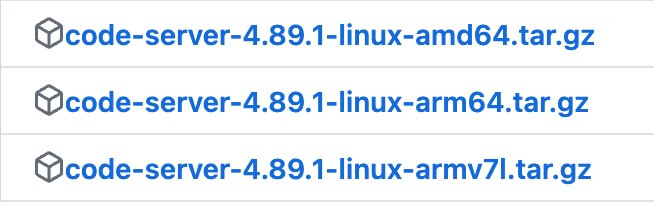
Code Server Packages

Different architectures require different builds:
https://static.1991421.cn/2024/2024-06-11-183158.jpeg

Script

uname reports the architecture:

arch() {
  uname_m=$(uname -m)
  case $uname_m in
    aarch64) echo arm64 ;;
    x86_64) echo amd64 ;;
    *) echo "$uname_m" ;;
  esac
}

ARCH=${ARCH:-$(arch)}

Once you know the architecture, downloading the matching package is trivial.

Cloud Server Architectures

Cloud providers (e.g., Tencent Cloud) display CPU architecture when you provision instances, so you can choose what you need up front:

https://static.1991421.cn/2024/2024-06-11-184222.jpeg

Final Notes

That’s it—simple and effective.

Authors
Developer, digital product enthusiast, tinkerer, sharer, open source lover
