While implementing “click to download selected filename” in a WebShell based on xterm.js, I ran into a challenge: how to determine the directory of the selected filename. After some research, here’s the solution.
Approach
First, have the terminal session report the current directory after each command using shell hooks.
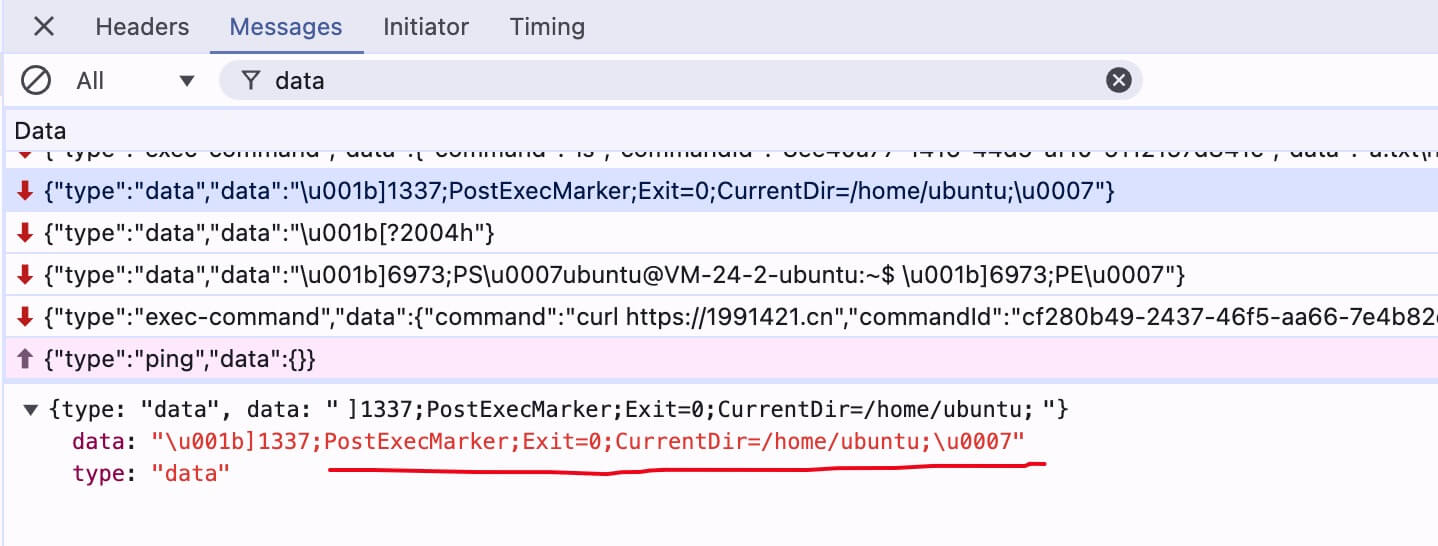
Use
registerOscHandlerto listen for ANSI sequences and extractCurrentDirfrom the data.
const cwdArr = []; // index 0 unused
term.parser.registerOscHandler(1337, data => {
  const currenDirArr = data?.match?.(/(;CurrentDir=)([^;\u0007]+)/);
  if (currenDirArr?.length >= 3) {
    cwdArr[term.buffer.active.baseY + term.buffer.active.cursorY] = currenDirArr[2];
  }
})
Listen for selection changes. Combine the selection position with
cwdArrto compute the CWD of the selected filename.term.onSelectionChange(() => { const selection = term.getSelection(); if (!selection) { return; } const selectionPosition = term.getSelectionPosition(); term.getSelection() && copyToClipboard(term.getSelection()); let rowNum = selectionPosition.start.y; // row while (rowNum < cwdArr.length && !cwdArr[rowNum]) { rowNum++; } const cwd = cwdArr[rowNum]; console.log('Selected file', pathJoin(cwd, selection)); });
Final Thoughts
This approach lets you infer the working directory that produced any particular section of terminal output and, by extension, the directory of a selected filename.

