Background
Airports often supply full Surge configs containing nodes, rules, scripts, etc. Sometimes I only want their nodes while keeping my own rules. Modules can override parts of a profile, but what if you want to ignore the provider’s rules entirely? Here’s the setup I use.
Create a Policy Group with Subscription Nodes
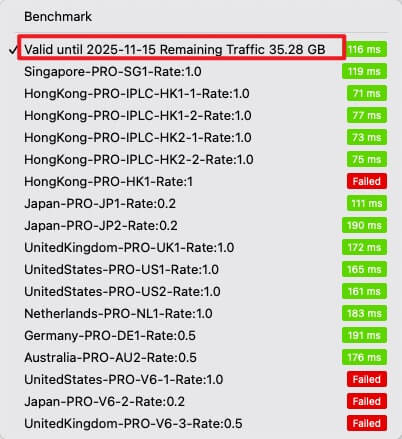
Add an external subscription policy group and enable auto-update. Use whichever policy type (auto/manual) fits your workflow.

Most subscriptions include a dummy node that reports remaining bandwidth. I keep it—it’s handy for monitoring quota.
Create Additional Policy Groups
Build other policy groups that reference the subscription group, and add any custom nodes you maintain manually.
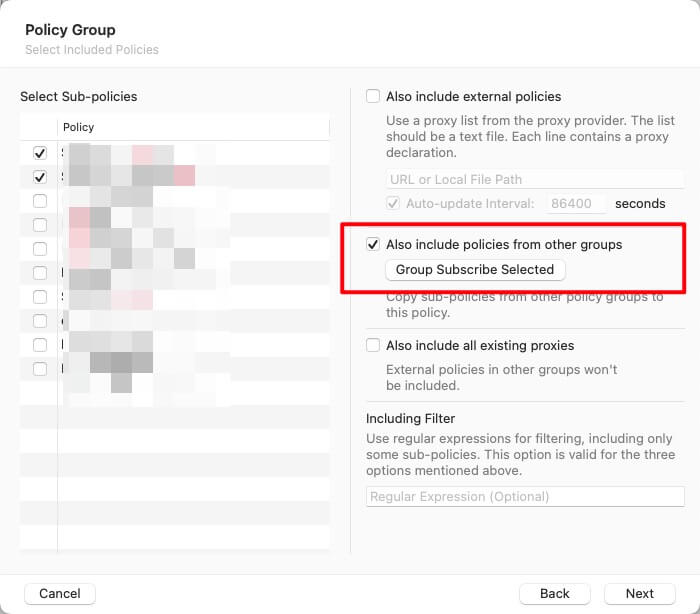
Now you have a policy group that combines all airport nodes with your own endpoints.
Use Filters to Build Specialized Groups
Need Netflix-only nodes (e.g., SG + JP)? Create a manual policy group, include the subscription group, and add filters to narrow the selection.
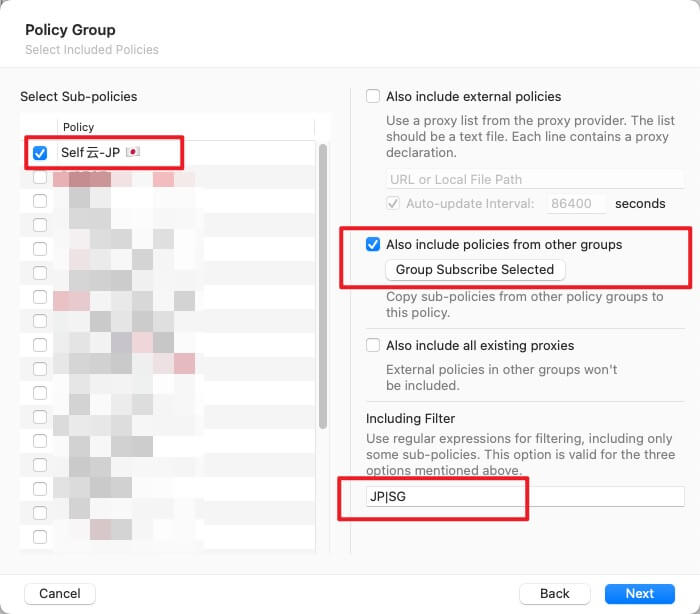
This approach lets you form country/app-specific policy groups. I have dedicated ones for Netflix, Spotify, Telegram, etc.

Add Your Own Rules
Because we’re not using the airport’s rules, add rules manually (or subscribe to trusted rulesets). To avoid surprises, I prefer explicit hand-maintained rules tailored to my setup.
Final Thoughts
With this structure you can subscribe to remote nodes, keep custom policies, and retain full control over routing logic.

