
Introduction
Screen Studio is a powerful screen recording tool exclusively for macOS. It helps users easily record on-screen operations and generate high-quality video files.
I recently purchased the lifetime license for $229 due to my video recording needs. After using it for a while, I’m quite satisfied and would like to share my experience.
Purchase
Screen Studio offers two purchasing options:
- Lifetime license
currently discontinued by the official site, subscription only - Subscription (annual/monthly)
I personally recommend the lifetime license, though it’s definitely pricey. Since the lifetime option is no longer available, the annual subscription is the better deal.
Too Expensive? Discount Codes?
Taking the annual subscription as an example, it’s $108/year. I recommend checking second-hand platforms or waiting for official promotions for discount codes, such as a 40% off code, which can save you quite a bit.
For example, these shops I found offer discount codes. If they’re still available, consider using them to save some money.

Where to Enter Discount Code

Payment Supports Visa/PayPal
PayPal is available in China. If you encounter errors with direct Visa payment, try using PayPal instead. Just link your domestic Visa card to PayPal.

Payment Issues / Payment Errors?
- Payment failure Card payments go through Stripe, which is an overseas service. If you experience payment issues without clear error messages, try opening the browser console — there are likely red error messages. It’s usually a network issue. Try using a proxy, switching browsers, or switching devices. Many beginner users around me have encountered this type of problem.
Don’t Know How to Pay?
You can ask someone for help, but fundamentally it’s something you need to figure out. Visa payments are very common and you’ll encounter them sooner or later. Payment freedom is an issue that, in my opinion, must be resolved.
Download
Screen Studio is not on the App Store. You need to download it from the official website. The official app supports both Intel and Apple Silicon chips.
Note that the following sites are NOT official — they are pirated/cracked sites that also sell the software, which is shameful behavior. Please support the official version.
These are pirated sites — do NOT use them: ❌ 🗑️ The official team is already consulting lawyers for legal action, though unfortunately enforcement costs are high in China.
Windows Support?
No, the official team has no plans to support Windows.
Beta Version - Try New Features?
If you want to try new features early, you can use the Beta version. The downside is that stability may not be as good as the release version.
Usage Tips
Here are some features I frequently use.
Recording Other Devices
iPhone/iPad Recording
Taking iPhone as an example: connect your Mac and iPhone with an official data cable, open Screen Studio, select the corresponding iPhone for recording. If your phone prompts you to trust the Mac, tap trust, then start recording.
Note In my testing, I found that third-party cables sometimes fail to be recognized. If you encounter the same issue, try using the official Apple cable.
Apple TV Recording
You’ll need to use QuickTime for this. You can either record with QuickTime first and then edit with other video editors, or directly use Screen Studio’s window recording to capture QuickTime’s Apple TV window.

Noise Reduction
During recording, there’s usually ambient noise. Screen Studio provides a noise reduction feature that you can enable during editing, and the results are quite good.
Export
Note: Screen Studio supports GIF export.
Share Links
If you want to share a video with others, the official service provides a sharing feature. Essentially, the video is uploaded to their servers, generating a link for quick sharing.
Note:
- Video duration is limited to 10 minutes.
- Shared links have no permission settings — anyone with the link can view it, but cannot download.
Quick Operations
Keyboard Shortcuts
Screen Studio has built-in keyboard shortcuts for quick operations, and they’re customizable.
RayCast/Alfred
If you have trouble remembering hotkeys, you can also use RayCast/Alfred for quick operations.
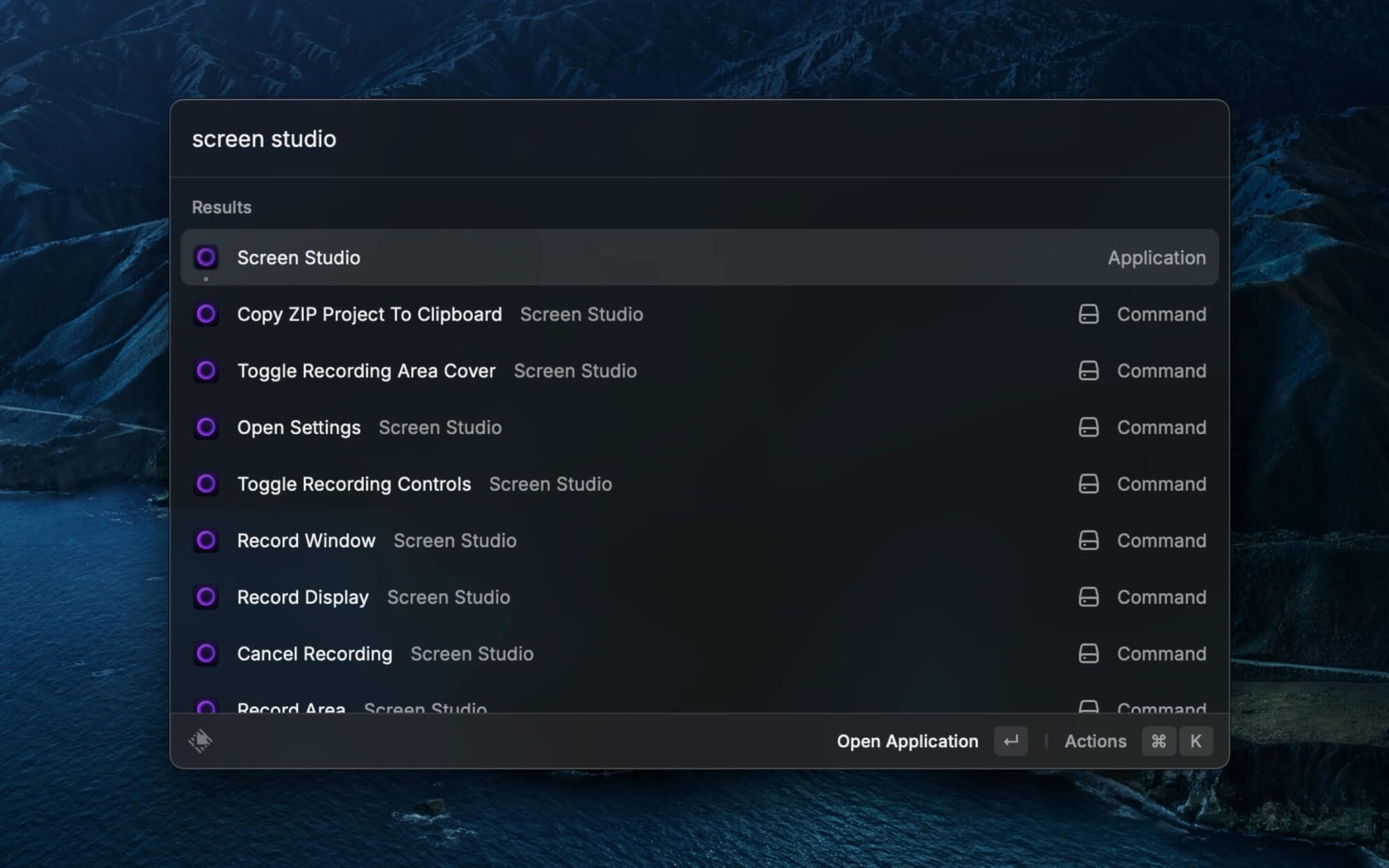
Personally, I prefer using hotkeys and GUI clicks directly.
What I Like About It
After using it for a while, here’s what stands out:
- Great app interaction experience and aesthetics.
- Easy to use — features like automatic focus zoom solve the issue of key content not being prominent in high-resolution recordings.
- Comprehensive functionality, including GIF export support, which I need frequently.
- Supports iPhone/iPad recording, and it looks beautiful.
Current Limitations
- The GUI doesn’t support language settings; it defaults to English with no option for other languages.
Regarding internationalization, I've consulted the official team — they currently have no plans to support it, and the feature is low priority. - Not cross-platform; doesn’t support Windows or Linux. This is unfortunate for non-Mac users.
- Auto-generated subtitles are low quality; I use other services instead.
- Video export is too slow.
Feedback Channels
Similar Tools / Alternatives
During my research, I also looked at other tools:
- OBS Studio
Open source, free - loom
Paid - FocuSee
Paid - tella
Paid - Cursorful
Free/Paid - OpenScreen
Open source, free
Personally, I find Screen Studio the most intuitive, but you might prefer other tools.
Final Thoughts
If you have this kind of need and the budget, I recommend Screen Studio.


