Recently, I needed to implement internationalization for my VSCode extension. Since the official documentation on this topic was sparse, with only an example provided, I’ll summarize how to implement internationalization here.
Internationalization can be divided into two categories: menu internationalization and extension content internationalization, such as prompt messages.
Menu Internationalization
Configure package.json
 "contributes": {
    "commands": [
 {
        "command": "gitlink.openInGitHub",
        "title": "%command.openInGitHub.title%"
 }
 ]
 }
Note that the title uses a key format, and the key needs to be wrapped with %.
Internationalization JSON Files in Project Root
Below are two language files, default English and Simplified Chinese. If other languages are needed, corresponding JSON files can be added.
- package.nls.json
- package.nls.zh-cn.json
The content format is as follows:
{
  "command.openInGitHub.title": "Open in GitHub"
}
Extension Content Internationalization
Create l10n Folder
Create an l10n folder in the project root directory.
Configure package.json
{
  "l10n": "./l10n",
}
Execute Resource Extraction Command
Execute the following command to extract all strings from the src directory to form internationalization JSON files.
npx @vscode/l10n-dev export --outDir ./l10n ./src
Note that files need to use the following format to be correctly extracted.
vscode.l10n.t('Congratulations, your extension "GitLink" is now active!')
Create Target Language JSON Files
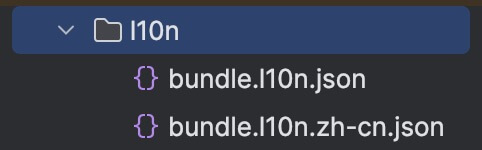
Test
With the internationalization configuration complete, try changing VSCode’s language settings to experience different languages during operation.

